Tag Archives: mouse

Epomaker Nex Lite Mouse Review: Affordable Gaming Upgrade

Disclaimer

Epomaker sent me the Nex Lite mouse for free to review for my blog. While I am very grateful for the opportunity, I won’t let it sway my opinions. This will be my honest review. Check out my review for the Epomaker Carbonis mouse and the TH80 keyboard. I’ll also be using my Amazon Affiliate link where possible. It really helps me out if you click it before you buy anything.

Table of Contents

What’s in the box?
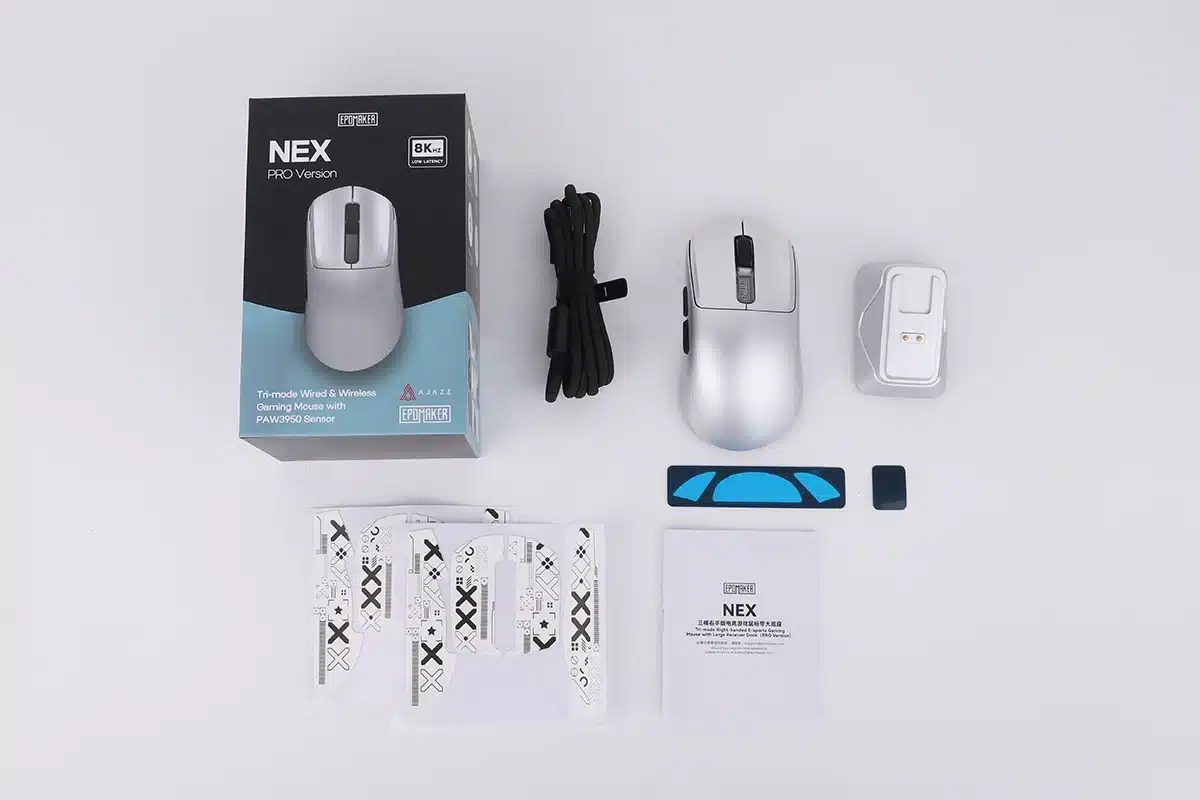
  • Next Pro Wireless Gaming Mouse
  • Magnetic Charging Dock
  • USB-C to USB-A Braided cable
  • User Manual
  • Slider Sheet
  • Grip Tape

Unboxing

Features

Epomaker just released its affordable, lightweight mouse that has everything you need to get you gaming comfortably. From its sleek ergonomic design to its long lasting battery, the Epomaker Nex Lite is ready to upgrade your setup at a very reasonable price.

Design

The Nex Lite is has been designed for both style and comfort. The mouse is available in four colors: black, blue, pink, and white. I got it in Pink because I get everything in pink and have no regrets.

This is a modern looking mouse with a screen that gives readers information like the current poling rate, the connection type, and the battery level. The included charging port displays the same information. Its ergonomic design is the perfect fit for medium and large hands. As someone with big hands, I have never felt more comfortable. As a nice little bonus, you get the full gaming power of RGB in both the mouse and the charging port. If you don’t want to maximize your gaming power, the RGB can be turned off for a more simplistic arrangement.

Performance

The Nex Lite is ready to bring up your dpf with its fast and seamless wireless connections. The stylish charging port doubles as a fast acting wireless dongle, but the mouse is ready for Bluetooth and wired connections when you need them the most. For those who want less wire clutter, the Next Lite boasts 50 hours of continues use on a single charge. That means you don’t have to worry about reconnecting mid team fight! With the adjustable polling rate at a press of a button, Epomaker has truly made a mouse that is ready for everything.

Review

I did not know what to expect from Epomaker’s $35.99 wireless mouse. The Carbonis had set such a high bar, and I braced myself for disappointment. I wasn’t ready for a smooth, textureless mouse. Luckily, the Nex Lite understood the assignment and exceeded my expectations. This affordable little mouse not only gets the job done right, it looks cool (which is arguably more important).

Quality

Everything on the Nex Lite is clean out of the box. It is well machined with no noticeable imperfections, and the light weight design doesn’t feel cheap. All of the buttons work and give off that satisfying click ASMR my body craves. The scroll wheel feels fantastic to the touch with a very smooth and accessible glide. Most importantly, the screen is clear and legible.

Aesthetic

This is a very classic looking mouse, but with a tangible ergonomic feel. I am a huge fan of the shape because of how modern it looks, but it is also comfortable enough for these tired old hands. The screen makes it look modern, but I hardly ever look down at at it. I still haven’t quite figured out how to turn on the screen to check the battery, but I guess its a good thing the dock has it as well.

The RGB on the mouse does seem unnecessary. It looks very cool when its on the table, but I don’t notice it when I’m using it. I couldn’t figure out how to turn it off, so I guess my desk is a rave now. The RBG on dock is very unnecessary. It is a bit distracting, but I do like that it lets you know when the mouse is fully charged. You can turn off the RGB on the dock with the touch pad, but it doesn’t work consistently. I just leave it off for now.

Comfort

The mouse is surprisingly comfortable. Cheap mice always tend to destroy my hands and render them useless after an hour of use. I can work all day and game the hours in between without any issue. While the mouse does look simple, it feels like it has been molded for my hand specifically. I wouldn’t get this as an ergonomic solution if you struggle with a repetitive stress injury, but you lucky folk out there were young healthy hands will love how the Nex feels.

Performance

I was able to do a few raids and even did some of my most repetitive data entry work with the Epomaker Nex and have no complaints. The adjustable DPI made it easy to switch between work flows, and the long lasting battery give me about the boasted 50 hours of uninterrupted work. Not that you are ever in danger of losing power because you always know how much battery you have left.

I did not notice any dip in performance during my testing. Everything seems responsive enough for my casual level of gaming, and the mouse switches between connections seamlessly. Overall, the Epomaker Nex is great value for the price.

Gimmicks

I will be honest, I don’t think the screens on the mouse of charging port are necessary. I rarely ever looked at either of the screens, and the mouse was always charged because I would leave on the dock. I absolutely love the charging dock. Not only does it make keeping my mouse charge convenient and stylish, it acts as a dongle. I am always struggling to find enough charging ports, and I am happy I can free up one to keep using my Epomake Nex.

The Nex also includes grip tape with design on it. I never installed it because it looks ugly. I’ve used it with the Epomaker Click Lite and didn’t think it added enough utility to merit the install so they went into the trash. I do prefer the Carbonis mouse for its textured finish, but I didn’t really feel the need even with my sweaty hands.

Conclusion

If you are looking for a cheap mouse, Epomaker made a hitter with the Nex Lite. The mouse is the perfect shape, weight, and it performs when you need it. If you don’t want to break the bank, or just need something for the next LAN party that you don’t mind losing (you will after using it), then pick up the Epomake Nex Lite. You can pick it up on the official Epomaker store, or through Amazon using my affiliate link!

Epomaker Carbonis Mouse Review: Performance Meets Style

Disclaimer

Epomaker sent me the Carbonis wireless gaming mouse for free to review on my blog. While I am very grateful for the opportunity, I won’t let it sway my opinions. This will be my honest review. Make sure you also check out my reviews for the TH80 V2 mechanical keyboard and the Galaxy Y100 Lite. I’ll also be using my Amazon Affiliate link where possible. It really helps me out if you click on it before buying anything.

Table of Contents

What’s in the box?

  • Carbonis Wireless Gaming Mouse
  • 2.4 Wireless Dongle
  • USB-C to USB-A Cable
  • User Manual
  • Brand Card

Unboxing

Features

Epomaker comes to gamers brings gamers the only mouse they will ever need with the the launch of the Carbonis mouse. This elegant mouse not only looks good, but it feels good and gives gamers the performance they need for high level play. If you are looking for a new mouse to get you out of your current elo, the Epomaker Carbonis might just be what you’ve been looking for.

Design

The Epomaker Carbonis dazzles with its unique modern design. This high quality gaming mouse comes in two colors: Black/Gold and Black Purple. I got mine in Black/Gold, but it was a very hard decision.

The Carbonis‘ unique pattern not only gives it its elegance, but makes the mouse sweat and fingerprint resistant. That means no more gross plastic after raid night! The composite carbon fiber shell is light weight and durable for that added peace of mind. The shell has been designed to perfectly fit most right-handed people for long comfortable sessions. To finalize the modern look, the Carbonis comes with a small LED screen to show readers the battery remaining as well as the current DPI setting.

Functionality

The Carbonis boasts fast speed and low latency with its wireless and wired connections. Users can easily switch between connections with a flick of the switch. You can also enjoy the fast wired connection when the 300mAh hour runs out of battery. The DPI can be easily adjusted with the onboard buttons so you always have the perfect speed for your workflow. For those of you who need a little added utility, the buttons, polling rate, DPI, and other useful features can all be easily adjusted through the official software (no download required).

Review

I am not going to lie, I was a little disappointed when I opened up the box. At first glance, the mouse is kind of ugly. I am not a fan of the wavy pattern, and a prefer a much heavier mouse. After using for as long as I did, this has replaced the ergonomic mouse I was daily driving. I don’t even know where my old mouse is anymore. The Carbonis is a fantastic mouse and an easy upgrade for any gamer or professional looking for a high quality mouse that works great and feels good in your hand.

Quality

The light weight design at first had me worried, but I think I am just used to a heavier mouse. I might have been a little biased. Out of the box, the mouse is fine. The pattern is very well done, the shape has been carefully crafted, and I didn’t notice any fabrication errors. Everything on this mouse is printed clearly and boldly, so I don’t think it will be rubbing off anytime soon. Most importantly, the buttons feel good and have a very addicting sound. I trust this mouse with my most sweaty team fights.

Aesthetic

The aesthetic is where the mouse loses me a bit. I am not a fan of the pattern, but I do appreciate the function. As a sweaty gamer, I understand when a cheap mouse is not up to the task. I never felt like my grip was in jeopardy. Most importantly, the mouse doesn’t feel gross after the those long gaming sessions. I got the Black and Gold version, so maybe it looks better in purple, but this is definitely a case where the utility outweighs the aesthetic.

Performance

I had no issues with my two weeks of testing the mouse. I used it for both gaming (I play a lot of Guild Wars 2) and all of my data entry work. This mouse performed very well under my very heavy hand. There was no latency on any of the three connections, with a speed I can always rely on. I love that I can change the DPI with the push of a button. The default setting were good enough for my workflow and gaming needs, but you can adjust it easily with software if needed.

The battery life is fine. I kept charging it when ever LED screen showed it was getting low so I can’t tell you how much use I got, but I was definitely able to get through the full eight hours on a single charge. Best of all, the charging port is in a convenient spot so you don’t ever have to break your stride (unlike the the Apple Mouse I wasted my money on).

Comfort

I wouldn’t call the Carbonis mouse exclusively ergonomic. If you suffer from hand pain and need an ergonomic solution, get a mouse with a ball and thank me later. For normal people however, the mouse has a comfortable grip.

In my journey to save my hands, I find that a lot of the advertising is a little misleading. Mice that have been designed to fit the hand don’t generally fit my hand, but the Carbonis fits wonderfully. (I have big hands). I did not understand how good the design for the Carbonis was until I had to use one of the loaner mice at work and it destroyed my hand in minutes. The Carbonis doesn’t destroy my hands, and I am able to get a healthy amount of use before my hands start cramping. Now I do have a repetitive stress injury that flares up with the wrong ergonomics, but the Carbonis is good enough and reliable enough to become a daily driver. I do have to take the occasional break, but I also have my backup roller mouse for the bad days.

I know I do not like the design, but man is the function cool. As a gamer with very sweaty hands, I like that my mouse isn’t a gross mess after I am done with it. This is a very comfy mouse for those gamers that spend a little too much time in online, team based games.

Conclusion

If you are looking for a good gaming mouse, the Epomaker Carbonis is king. This is a very comfy mouse with the functionality to back it up. Sure it might look ugly, but how often are you really looking at your mouse? The only problem I have with the Carbonis is with the wireless Dongle. Instead of a traditional usb that you plug into a slot, you get small rechtagle that you have to plug into your computer using the only USB-C to USB-A cable included in the kit. This not only looks ugly, but I am pretty sure I am breaking the dongle before the year is done because it will fall on the ground and I won’t notice it. People who use Bluetooth can rest easy. Other than that, this is a fantastic mouse that I will be daily driving. Get yours today!

You can pick up the Carbonis Wireless Gaming Mouse on the official Epomaker store or on Amazon through my affiliate link.

Tech Review: Logitech M570

The Logitech M570 was the first mouse I purchased on my first attempt to make my setup more ergonomic. I have since upgraded to the Logitech MX Ergo, but the Logitech M570 is a valuable contender in your search for better ergonomics.

Please note that I am not a doctor, and any advice I give here is strictly based on my experience. Always consult your doctor with any ailments. Please note that I will be using affiliate links for this product. If you do choose to buy this mouse, I get some money as compensation. Regardless, these will be my honest thoughts on the product.

The Logitech M570 is a wireless rollerball mouse. This mouse is not rechargeable and requires AAA batteries. A set of these is included in the box, and I got about a year of continuous use before having to change them out. This mouse is not Bluetooth compatible and requires an included dongle to connect to your device.

Out of the box, the cursor speed is slow, but this can be easily adjusted in your computer settings. A third-party application is not required to use this mouse.

One thing to keep in mind with Roller balls is that they do get dirty over time. To avoid a drop in sensitivity, clean regularly. Cleaning the Logitech M570 is incredibly simple. To clean the mouse, simply remove the ball from the socket and clean the inside of any debris.

This mouse is good for gaming. You don’t get any extra keybinds, nor will be ideal for high-end competitive play, but it will allow for a more comfortable gaming session. I didn’t notice any negative effects to my gameplay when I made the switch.

I used this mouse for about a year before making the change. It took me a couple of days to get used to the movement and find a sensitivity that met my needs. I had been struggling with repetitive stress disorder in my hands and wrists up to this point, and the pain made work difficult. Switching to this mouse helped tremendously with this issue, and I keep this mouse at the office for work.

I love this mouse and recommend it if you are looking to upgrade your mouse. The only reason I made the switch to the Logitech MX Ergo is because I spend too much time in front of a computer. While the M570 did address a lot of the issues I was having before, I found that the pain would return after a certain amount of hours. This shouldn’t be a problem for most people who use their computers a healthy amount. The M570 will be a fantastic upgrade to your ergonomic setup.

The Logitech M570 is currently $79.99 on Amazon.