KiiBOOM sent me a free set of the Spout Picnic Keycaps to review for my blog. While I am very grateful for the opportunity, I won’t let it sway my opinion. This will be my honest review. Make sure you also check out my reviews for the Dough Fluff Keycap set and the Strawberry Jello Switches. I’ll also be using my Amazon Affiliate link where possible. It really helps me out if you use it.
What’s in the box?
144 Keycaps
Features
The Sprout Picnic Keycap set comes with 144 picnic themed caps ready to upgrade any aesthetic. These high quality caps have been designed to not only look cute as all heck, they are comfortable too. These high quality caps are well machined and painted to last no matter the workload. These caps are compatible with Cherry MX and most MX-style switches. Whether you are rocking a minimalist 60% or using all the keys a full-sized keyboard has to offer, the KiiBOOM Sprout Picnic keycaps to brighten up your setup with its whimsical floral theme.
Review
I used the Sprout Picnic keycap set to upgrade a very cheap keyboard I had lying around and am blown away by the improvement. Users will be impressed by the high quality craftsmanship that goes into the manufacturing of the this set. Each cap is not only well machined, but printed with clear high quality images that give this set its unique flare. The unique design of the caps not only look good, but give users a comfortable typing experience. The caps are very soft and I love how the shape hugs my finger with each key press. This made typing a delight!
As far as the design goes, I think its cute with a good amount of flavor, but it leans a little heavy on the matcha theme. I love matcha and have no problem, but it is something to be aware of. Either way, you are getting an adorable set of keycaps that look good and are incredibly easy to install.
KiiBOOM sent me the Dough Fluff keycap set for free to review for my blog. While I am very grateful for the opportunity, I won’t let it sway my opinions. This will be my honest review. If you enjoy my review, please don’t hesitate to ask. Make sure you also check out my reviews for the KiiBOOM Strawberry Jello Switches and the Jade75 Keyboard.
What’s in the box?
141 Dough Fluff Keycap Set
Features
The KiiBOOM Dough Fluff Keycap Set are an adorable whimsical desert themed set for those looking for a colorful cozy aesthetic. Each key features a unique desert themed design printed into a high quality key cap. The set comes with 141 keys compatible with Cherry MX and most MX-style switches. I recommend checking out the KiiBOOM Strawberry Jellow switches if you want to stay on theme. With 141 key caps, users can upgrade anything from the most compact 60% keyboard, to the largest full sized key board. It doesn’t have to match (Mine doesn’t), but it might be better if it does. They high quality build means you can enjoy your adorable new keycaps no matter the workload.
Review
I used these keycaps to upgrade a cheap mechanical keyboard I had laying around. There was nothing wrong with the keyboard and felt it was the best way to test the quality of the KiiBOOM keycaps. I did not understand how cheap the original keyboard until I upgraded to the KiiBOOM components.
The KiiBOOM Dough Fluff Keycap Set are not only an adorable set with fun flavor, they are high quality keycaps that are ready to take on any workload. I was impressed by how well crafted each cap is. I love the design of each key, and appreciate how high quality the printing is. It definitely feels like the design isn’t fading any time soon. My only complaint is that the keycaps don’t match the keyboard I put them into, but that is more my fault than KiiBOOMs.
What I like the most is how the design feels. The keycaps feel and look like marshmallows which not only adds immersion to the theme, but makes typing a delight. I never thought keycaps made much of a difference in a build, but the Dough Fluff set proved me wrong. I am very excited to check out the other caps in my collection!
If you’re looking for a cute and fun keycap set to liven up your setup, the KiiBOOM Dough Fluff set is a great place to start. Whether you are starting a new build, updating an old one, or upgrading a cheap one, the KiiBOOM Dough Fluff keycaps will not disappoint.
EasySMX sent me the S10 wireless gaming controller for free to review for my blog. While I am very grateful for the opportunity, I won’t let it sway my opinions. This will be my honest review. Make sure you check out you also check out my review for the X15 Controller. Make sure you use my discount code Jose S10 at checkout for 10% off your purchase.
What’s in the box?
EasySMX S10 Gamepad
2 x Magnetic Faceplates
1 x Circular D-Pad
1 x Cross D-Pad
USB-C to USB-A Cable
2 x Sticker Sheet
1 x User Manual
Features
With the population of Switch 2 growing against the overall gaming landscape, so too grows the need for high quality peripherals, and EasySMX has come up with an affordable and beautiful solution. For an unbeatable price of only $59.99 (51 with my discount code), gamers can enjoy the feature-rich gamepad in either black or white:
The controller looks great in either color, but the white will be prone to smudging. Of course, this wouldn’t be a gaming peripheral without RGB, and the S10 has a beautifully lit face that acts as a subtle accent without turning your room into a rave. For a bit of added flare, the controller comes with two sheets of stickers and magnetic plats so that you can personalize your controller to fit your style.
Fortunately, the S10 is deeper than its aesthetics. The S10 is ready to upgrade your Switch gaming experience to the next level with its many optimized features. Its advanced mecha-buttons give players a very clicky sound but the precision and longevity they need to game uninterrupted. The TMR Sticks are not only precise, but promise a comfortable smooth glide. Most importantly, the high speed low latency connection for both its wired and Bluetooth modes means this controller is ready to compete in the most competitive of arenas. Couple this with its solid battery life, and you have a fantastic upgrade to any setup.
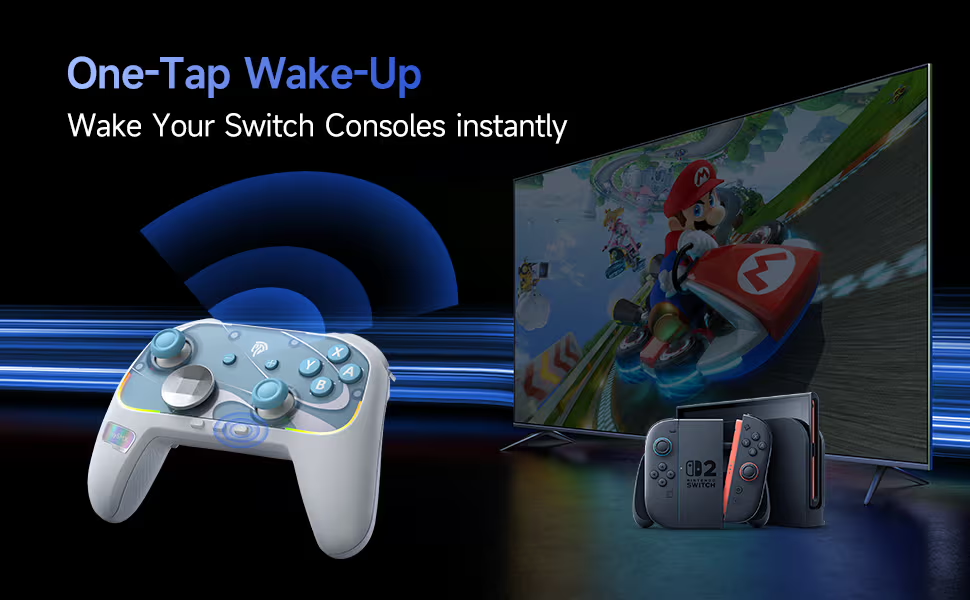
Most importantly, the S10 has been optimized for the Switch, with a lot of the features Nintendo users crave. The S10 comes with advanced motion controls, a built NFC reader for all your amiibos, and a one-tap wake-up feature for the Switch 2. But if you don’t have a Switch, you can enjoy the controller with any of your other devices.
Review
Users will open the box and appreciate how well made and pretty the S10 controller is. It is a little on the lighter side, but it certainly doesn’t feel cheap. I particularly like the textured handles that give the controller its satisfying feel. The additional faceplate and stickers are fun for those who want to customize the controllers, but I am not creative enough to take advantage of this feature. This is a very pretty controller without the need of customization. I love the RGB and how it doesn’t feel intrusive, but it can be shut off if you don’t like it. I think it gives the controller its flare.
Getting past the looks, users will be impressed by the amount of features the controller comes with. The two extra buttons on the bottom of the controller are a very useful and have become a staple in my gaming journey. My favorite feature is the circular D-Pad that made it feel like a smooth joystick. I like that I always have the option to switch to a regular cross D-Pad, but I am finding it hard to. Other than that, the control works well. The haptic controls feel good and add to the immersion, the NFC reader picks up my Amiibos, and sticks feel really good. The controller is responsive out of the box, and it was able to handle all of my gaming needs. Of course I am just a filthy casual, but there is value in it for me regardless.
As great as this controller is, I do have a couple of complaints. One of my complaints is with the sound of the switches. While I didn’t notice any imput lag in either of the connections, the clicking button pressing makes sounds cheap and can get annoying. If you like the ASMR experience that comes with mechanical keyboard switches, there is some value in the S10. I wouldn’t call the sound a deal breaker, but it is something to consider.
My biggest issue with the controller is comfort. Full disclosed, I have a repetitive stress injury that requires certain ergonomics. Controllers, especially cheaply made controllers ruin my hands. While the S10 isn’t the most comfortable or ergonomic controller, I was able to get enough meaningful gaming to keep it in my rotation. The S10 may cause some discomfort, but it is a lot more comfortable than using the joycons.
So what is my final verdict? If you have a switch and need a new controller, the EasySMX S10 is a fantastic option. The gamepad looks great, has a lot of useful features, and is an upgrade from the joycons. You can pick up your S10 gamepad from the official SMX store. Make sure you use my discount code Jose S10 to save a bit of money.
The KiiBoom x Strawberryjam1986 Strawberry Jello Switch Set comes with 35 5-pin switches. These are linear switches compatible with MX keycaps. Rated for up to 50,000,000 keystrokes, these switches are built to last. These switches were also built to perform and take on any workload with its ideal actuation and high-accuracy feedback. Most importantly, the housing promises a comfortable typing experience with that satisfying typing ASMR enthusiasts seek.
Sound Test
Review
I used the Strawberry Jello switches to replace the ones that came with one of my budget keyboards. I did not know how budget the keyboard was until I started taking it apart. These switches were a fantastic upgrade, and made an a very usable keyboard into a delight. I first noticed the soft creamy sound that I have come to crave when I am typing. I then noticed how much more comfortable the switches were to use. Each press felt softer and I felt my hard hurt less and less the more I used this keyboard. I did not notice any change in performance. The previous switches did the job, and these handled my workload just as well. The only real difference is that the old switches feel cheap, and I have no intention in putting them back.
If you are looking for a set of switches to either give new life to an old mechanical keyboard or if you’re building a brand new one, these are the KiiBOOM Strawberry Jellos are a great place to start. They are easy to install, they are well crafted, perform well, and they are very cute. If you’re looking to build a cozy setup, you can’t go wrong with KiiBOOM stuff, especially with these switches.
Epomaker sent me the TH108 Mechanical Keyboard with the Sea Salt Silent switches for free to review for my blog. While I am very greateful for the opportunity, I won’t let it sway my opinions. This will be my honest review. Make sure to check out my latest reviews for the HE68 and the HE80 keyboards. I’ll be using my Amazon Affiliate link where possible. It really helps me out if you use it.
What’s in the box?
Epomaker TH108 Full Sized Gaming Keyboard
USB-C to USB-A cable
Wireless 2.4Ghz Wireless Dongle
2 x Extra Switches
Key/Switch Puller
User Manual
Features
The TH108 is a stylish full-sized keyboard mechanical gaming keyboard. It comes with 108 keys that are easily hot swappable and customizable. The keyboard comes with the Epomaker Creamy Jade switches for the users who want that satisfying thack when they type, or they can opt for the Sea Salt Silent Switches for when they want something a bit more subtle. No matter what switch you choose, you are getting a stylish well machined machine that is available in all black, or a very pretty subtle blue. With the that beautiful south facing RGB as the perfect accent, this keyboard will truly shine on any desk.
But the TH108 is more than just its looks and many keys, it is ready to perform and take on any work load. The TH108 comes with an impressive 8000mAh battery, which means you won’t be reaching for that chord unless you really need to. The 5-layer padded gasket gives the keyboad its satisfying sound and comfortable feel. The switches, whichever you choose, along with the cherry profile keycaps and the perfect adjustable typing angle ensures an almost universally comfortable typing experience. All the glamour and comfort is of course meaningless without the keyboards high speed low-latency wireless and wired connections. The TH108 is ready to upgrade any station, no matter what it’s for.
Sound Test
Review
Users will be impressed by the emasculate build of the TH108. The keyboard may be on the lighter side, but it does not feel cheap. The gasket and switches all look well machined, and the printing on the caps is clear and crisp. I received the blue variant and the color scheme is very pretty. If you are looking for a mechanical keyboard but don’t like the sound, it doesn’t get any quieter than the Sea Salt Silent switches. These things are quietest switches I’ve ever used, and I am sure my wife appreciated every minute of them. If you do enjoy the keyboard ASMR, the Creamy Jade switches are solid and have a very satisfying sound.
The TH108 is also very comfortable. I thought the Sea Salt Switches were a little on the stiffer side, but once I got used to it, I prefer the feedback. Each keypress felt impactful and it didn’t destroy my hands. While I do appreciate the adjustable height, the default typing angle is excellent. I wouldn’t say this keyboard is the ergonomic solution you are looking for, but most users will find it very satisfying. I need special ergonomics for my hands, but the TH108 is very good contender for what I keep in my rotation.
But the keyboard is more than just its pretty aesthetic and silent gimick. This keyboard performs well. It was able to handle all of my gaming and workload without issue. Most importantly, I rarely had to plug it in. I got about 10 hours of use out of the box, and I can’t remember charging since. The wire connection is nice if I want to be competitive, but anything that cuts down my wire clutter is a winner.
If you are in the market for a full-sized keyboard, the TH108 is a fantastic budget option. This keyboard looks good and works great. You can pick up your TH108 on the official Epomaker store, or on Amazon through my Affiliate link.
Epomaker sent me the HE68 Lite Hall Effect Gaming Keyboardfor free to review for my blog. While I am very grateful for the opportunity, I won’t let it sway my opinions. This will be my honest review. Make sure you also check out my reviews for the Magcore87 keyboard and the EK21 keypad. I will also be using my Amazon Affiliate link where possible. It really helps me out if you use it.
What’s in the Box?
HE 68 Lite Hall Effect Gaming Keyboard
3 Additional Switches
Screws for Adjustments
Hand Strap and Strap Accessories
USB-C to USB-A Cable
Key/Switch Puller
User Manual
Features
The HE68 Hall Effect Gaming Keyboard is a 65% portable wired keyboard that does not break the bank. Its light weight and compact design make it perfect for travel, and the included hand strap makes it much more convenient. With a total of 68 programmable backlit keys, users can enjoy a versatile gaming solution for only $40. Users can customize the polling rate and actuation of the HE68 Lite for an experience that not only fits their gaming style, but takes it to the next level. It is also SOCD and DKS ready for those who need that extra edge. With the ability to easily program macros, the HE68 proves to be a powerful machine in a small package. Some people may be disappointed by the lack or wireless support, but a wired connection is unparalleled when it comes to performance and reliability. Luckily, the HE68 lite promises to do both at a very reasonable price point.
Sound Test
Review
Users might be disappointed by the HE68 Lite at first glace. The keyboard feels like cheap plastic, but it looks well made. The keys are printed clearly and everything else is well machined. The light weight design does make it ideal for travel, and it does feel sturdy enough to survive a few trips.
Using the keyboard might bring a bit more disappointment. If you’ve used good switches before, the HE68 feels cheap. Typing sounds like plastic pieces banging against each other, so don’t expect that satisfying clacking you’d get from a nicer mechanical keyboard. The switches also feel a little stiff. Adjusting the actuation helps, but out of the box experience isn’t satisfying. That said, the keyboard is comfortable enough to use, even for long sprints. It may not be strictly ergonomic, but it didn’t trigger my repetitive stress injury like other cheap keyboards have done.
As for the keyboards performance, you are getting a powerful contender at the price point. There was ghosting and the HE68 proved very responsive. It was able to handle my level of competitive as well as my everyday workflow without issue.
At this price point, you aren’t doing much better. They keyboard works well out of the box and has a few interesting features that give it a respectable amount of versatility. If you are looking for an affordable gaming keyboard or something you can travel with, I don’t think you can find much better than the HE68 Lite gaming keyboard.
The HE80 is Epomaker’s budget solution to serious gaming. This light weight stylish wired keyboard is an efficient 75% keyboard, giving its user enough keys to play their kits. Each of its 82 keys are illuminated by a per key programmable RGB for some added flare. In addition, the actuation for each switch can be programmed for comfortable competitive fit of up to .02MM trigger with zero dead zone. The wired connection ensures a fast low latency connection at 8k polling and 32 scan rate. For those in need a bit more utility, macros and rebinds can be easily programmed with through the official web based driver. If you are looking to upgrade your gaming prowess without breaking the bank, the Epomaker He80 promises to do just that.
Sound Test
Review
Opening the HE80, users will be impressed by the keyboard’s sleek design. The black keyboard is cleanly machined with a couple clear purple keys to give it a bit of flare. Picking up the keyboard might disapoint some folks. There is a bit of flex to the light weight plastic body, but nothing that makes it unusable. The keyboard certainly does not feel cheap through use. The hall effect switches give the keyboard a soft and comfortable profile, although the sound is not as tacky as I would like it to. If you are looking for a keyboard with a satisfying mechanical keyboard sound, you won’t get it here.
What you do get here is a wired keyboard that performs well. Although I would have preferred not to clutter my desk with another wire, I do appreciate the low latency connection. I don’t compete at a high enough level in gaming to take full advantage of the keyboards high potential, but it handles my level of casual gaming without out issue. Being able to easily reprogram bindings and macros on the device is nice feature to have.
Most importantly, the keyboard is comfortable enough for my needs. The HE80 comes with a decent typing angle that will be fine for most users, but it is adjustable. The customizable actuation makes the keys as soft and reactive as you need them to be, for both that competitive and comfortable advantage. I wouldn’t say it is ergonomic because my hands did begin to get sore after prolonged use. Note that I do have a repetitive stress injury and use the keyboard a lot more than the average user. With my injury, I was able to get a respectable amount of work and play with the keyboard, normal users should be fine.
Epomaker sent me the Magcore 87 Mechanical Wired keyboard to review for my blog. While I am very grateful for the opportunity, I won’t let it sway my opinions. This will be my honest review. Check out my reviews for the Epomaker EK21 numbpad and the Click lite gaming mouse.
What’s in the box?
Magcore 87 Mechanical Keyboard
USB-C to USB-A Braided Cable
3 Extra Switches
Key/Switch Puller
Extra Key Caps
User Manual
Features
The Magcore 87 is Epomaker’s premium wired keyboard for the enthusiasts who needs customizable utility. The TKL layout puts every key in reach to maximize space and efficiency. The 87 keys are powered by the Kaih Box Inductive switches with adjustable actuation for the perfect level of comfort and typing experience. These are durable switches that promise a stable and consistent performance with 8K polling rate though its high quality wired connection. To complete the package, the clean aluminum body gives it the sturdy premium feel and the customizable RGB backlights give it the perfect amount of flare. You will be hard pressed to find a better performing and luxurious keyboard on the market.
Sound Test
Review
Users will be impressed by the Magcore 87‘s premium feel. The gasket is cleanly manufactured and the keys are clearly printed. I love how the clear purple keys accents the black. The kit includes extra keycaps if you prefer to have an all black keyboard. Once plugged in, users can appreciate an RGB effect that is customizable and not too distracting. There is no denying that the Magcore 87 is a very pretty keybaord.
Using the keyboard, I was impressed by how comfortable it became. The layout and shape took some getting used too, but once everything clicked, I had no issue. I wouldn’t call it an ergonomic solution, but I was able to handle my typical long sessions in front of my computer with minimal soreness. I am a little bummed that the the height isn’t adjustable, but the typing angle should be good for most users.
My only complaint is that the keyboard adds clutter to my desk. I would love to reduce the amount of wires that reach across my desk, but I can’t complain about the performance. The adjustable actuation is a nice feature for those who need it, but it is battle ready out of the box. It was able to handle all my gaming and workflow needs, but I can’t speak on how it performs at a more competitive level of gaming. It is at the very least, good for the higher end of casual play.
If you are looking for a premium feeling wired keyboard, the Epomaker Magcore 87 is a fantastic choice. This keyboard is comfortable with solid performance and a clean modern aesthetic that will upgrade any workspace or battle station.
Epomaker sent me the EK21 keypad to review for my blog. While I am very grateful for the opportunity, I won’t let it sway my opinions. This will be my honest review. Make sure you also check out my reviews for the Click Lite Gaming Mouse and Alice Tide Keyboard. I’ll be using my Amazon Affiliate link where possible. It really helps me out if you use it.
What’s in the box?
EK21 Keypad
Key/Switch Puller
USB-C to USB-A Braided Cable
2.4Ghz Wireless Dongle
User Manual
Features
The Epomaker EK21 is ready to take on any workflow. It only comes in black, but its stylish modern design helps it fit most desk aesthetics. It features 20 hot swapable keys illuminated with beautiful south-facing rgb effects. All 20 keys and the nob can be easily reprogrammed through VIA for some added versatility. The gasket design and shape of the key caps give users a comfortable typing experience, while also letting off a satisfying tack that doesn’t get too loud. The EK21’s lite weight, respectable 1000mAh battery, and wireless capability make it the ideal travel accessory. If you’re looking for 20 more keys to enhance your productivity, check out the EK21 keypad.
Review
The EK21 does look a little cheap, but the keypad is well machined. The numbers are clearly printed, the color scheme is nice, and the knob has a nice tactile feel. I do appreciate the keypad’s light-weight because I did end up having to travel a lot with it. Most importantly, the keypad is very comfortable. It not only made my data entry and number crunching easier than using the number row, it helped some of the strain from my hand. I did a bit of reprogramming on VIA. I don’t need to do it for my workflow, but it is a nice feature to have and I like how easy it was to set up.
As far as function goes, the Keypad functioned as intended. It was very responsive out of the box with out any glitching, and I haven’t had to charge the battery since I opened it. I always keep the RGB on and the RGB profiles are very subtle and fun. You can turn it off for additional battery life.
Ultimately, if you need a keypad for your workflow, this is a great budget option that feels good, looks great, and gets the job done. At only $40, the EK21 is a powerhouse of utility in the perfect sized package.
Epomaker sent me the Click Litewireless gaming mouse to review for my blog. While I am very grateful for the opportunity, I won’t let it sway my opinions. this will be my honest review. Make sure you also check out my reviews for the Split65 and the Tide Alice keyboards. Check out my newest sponsor, NordVPN if you’re looking for that service. I will also be using my Amazon Affiliate link where I can. it really helps me out if you use it.
What’s in the box?
Click Lite Wireless Gaming Mouse
2.4 ghz Dongle
USB-C to USB-A Charging Cable
User Manual
Decals
Features
If you’re looking for a quality budget mouse, you’ll struggle to find one with more features than the Click Lite. This light weight mouse at only 59 grams and features a stylish design contoured to fit your hand. The mouse comes in black and white, and both look amazing.
The Click Lite comes with 5 programmable buttons that can be easily customized to include macros. The sensor can be easily customized to support 800 – 24000 DPI and a stable 1000Hz polling rate with 1ms latency for some unbelievable accuracy. Users can enjoy up to 72 hours of high-speed wireless and Bluetooth connections with its 500mAh battery life. While the mouse doesn’t have any RGB, users can enjoy some added customization with the included decals. If you’re looking for a quality budget gaming mouse, it doesn’t get much better than the Click Lite.
Review
Out of the box, users might be disappointed by the light weight. The mouse feels and looks like plastic, but it is well designed with clean manufactured pieces. I prefer heavier mice, so it took some time to adjust to the Click Lite. Once I did however, it became difficult to see a future where it wasn’t my daily driver. I was very impressed by how snappy and responsive the mouse is out of the box. Normally I spend time adjusting settings, but the Click Lite was essentially plug and play. I did mess around settings for testing and rebound some buttons for quality of life, but the mouse comes ready for most workflows. Over my use, I did not notice any dips in performance, and it was able to handle the different games I through at it. I play a lot of casual games, and it was able to handle Guild Wars 2.
One thing I did not like about the mouse is the included decals. They offer no texture and if you don’t put them on properly, it ruins the aesthetic. They are also starting to look dirty after only a week of use, but I guess it is a good thing they include two. This isn’t a deal breaker, but it looks better without the decals. I would have preferred they include grip tape because my hands get very sweaty, and the mouse gets a little slippery.
This mouse is not ideal if you are looking for ergonomics that won’t ruin your hands. It is comfortable enough for normal use and people who don’t suffer from the repetitive stress injuries, but it did start hurting after a while. This issue is very specific to me, and even then, I got enough use out of mouse to make it worth it. I won’t be using it for work to save my hands, but I will be keeping it around for gaming. I just like how good and snappy it feels when gaming.
If you’re looking for a solid mouse to upgrade your setup, get the Epomaker Click Lite. The mouse looks cool without the need of RGB, it is very responsive, and is comfortable enough for most cases. You can pick up the Click Lite on the official Epomaker store, or on Amazon through my affiliate link.