Tag Archives: keyboard

Unboxing the Redragon Artemis K719 Pro

Disclaimer

Redragon sent me the Artemis K719 Pro mechanical keyboard for free to review for my blog. While I am very grateful for the opportunity, I won’t let it sway my opinions. This will be my honest review. Make sure you also check out my reviews for the Redragon Aatrox MMO mouse and the BS8773 mouse and keyboard bundle. I’ll also be using my Amazon Affiliate link where possible. It really helps me out if you click on it before you buy anything.

Table of Contents

What’s in the box?

  • Artemis K719 Pro Keyboard
  • USB-C to USB-A Cable
  • Wireless Dongle
  • Key/Switch Puller
  • 4 Spare Switches
  • Redragon Stickers
  • User Manual

Unboxing

Features

If you are looking for an affordable mechanical keyboard that performs well, gives you that clacking that you need, but also looks good, Redragon might have solved your problem with the Artemis K719 pro and its many flavors. The Artemis pro promises to be the only keyboard you need at a reasonable price point, it is just a matter of choosing the right color for your aesthetic.

Aesthetic

The Artemis K719 pro is a modern looking, fullsized keyboard available in five unique flavors: essential black, graffiti, anime, jade cloud, and ice blue. I got mine in the anime themed and feel like I made the right choice, but there is a flavor out there for everyone.

Each of the five designs is backed by the high quality Redragon standards for a keyboard that not only looks and feels good, but will stay looking good for those long sweaty game sessions. The Artemis Pro is a full-sized keyboard with 95 keys, all backlit with fun preprogamed RGB effects. For those who want to truly shine, the display screen is not only useful, but it customizable for a the ultimate personalized experience. But this keyboard is more than just its fun themes, it is ready to perform when you need it the most.

Performance

The keyboard comes with Redragons linear Hi-Fi switches for a soft typing experience that still provides users with that sweet asmr. The switches and keycaps can be easily swapped for longevity, or for those who like to keep things fresh and exciting. Each of the 95 keys can be programmed through the official Redragon software for added utility, perfect for those of you who need a few extra macros to maximize their workflow.

While users can always enjoy a high speed wired connection, those who prefer less wire clutter can enjoy comparable wireless speeds through the Bluetooth and wireless dongle. The added peace of mind the impressive 5000mAh batter and the handy LED display give its users the peace of mind they need when entering that next important dungeon. But a keyboard is only as good as the comfort it provides.

Comfort

The Artemis Pro is designed for comfortable long sessions of work and play. Its padded gasket design provides users with enough sound to be soothing without annoying the whole neighborhood. The contoured dye-sub PBT keycaps not only look good, but promise to give users a comfortable typing feel. Most importantly, the hi-fi switches are here to perform when you need them, but give you the comfort you need to keep going. Couple all this with an excellent typing angle that can customized with the onboard kickstands, and you have a keyboard that will get you through most of your team fights with out any of the unnecessary fatigue.

Sound Test

Review

I’ll be honest, it took me a bit of time to understand my love for the Redragon Artemis Pro. While I am a huge fan of the cute anime girl that decorates the plating, there was some initial disappointment. They keyboard feels cheap, and the sound is cheaper. Once I kept using the keyboard, it became the keyboard I’ll keep on my desk even as I move on to other keyboards. This is a great feeling keyboard with an excellent aesthetic and it exists at a consumer friendly price point. If you are looking for a gaming keyboard that will perform and has enough quality to get you through those next few important games, you’ll be hard pressed to find something better than the Redragon Artemis K719 Pro.

Aesthetic

It is no secret that I picked the Artemis pro for the waifu design. Upon opening the box, I was surprised by the detail. The keycaps are clear and legible, and they haven’t faded yet. I am a huge fan of cute anime girl that sits on the underside. The theming is excellent. I love the small fun details that replace the traditional lettering, like the use of daggers instead of arrows or the hot waifu on the spacebar. The sleek modern design makes the keyboard a conversation piece on any table. I am sure the other colors are cool as well, but I am more than happy with my anime themed keyboard.

Quality

Out of the box, users might be a little concerned about the quality. Don’t get me wrong, the keyboard looks cool. I got the anime themed one and everything is clean. The manufacturing is solid and the printing is clear. Taking the keyboard out of the box, users might be a little concerned by the light-weight keyboard and the amount of flex it has. You don’t notice the flex when you type, but you do notice the cheapness of the keycaps. They aren’t the worst keycaps I’ve typed with, but they did take some getting used to. However, after two weeks of use, I have no issues with the quality.

Gimmick

The K719 comes with knob for volume and media controls as well as an LED screen. The knob is invaluable for my keyboards. I need the ease of adjusting the volume on the fly, especially since not every video I watch exists at the same volume. Media controls are a fun bonus because sometimes I need to pause the video to listen to the cutscene, and its nice to not have to tab out the game. The LED screen is nice, but it isn’t the reason to buy the keyboard. Having information like battery level, date, and time is nice, but I rarely look at it. Customizing the screen with a gif is fun, but I quickly forget that I did it. It is a cool gimmick for those who like to customize everything, but there isn’t much utility to it.

Performance

The keyboard worked as intended. I didn’t notice any ghosting or latency. I was able to type through all those work emails, write all these blog posts, and put a respectable amount of hours in Guild Wars 2. t. The battery life is fine. I was able to get about 10 hours of work on a charge, which is fine for most users. I didn’t really try to program any macros except for the few I need for data entry, but the process was simple enough. If you are looking for a keyboard that works great out of the box, the K719 is one such keyboard.

Comfort

The comfort is where this keyboard really surprised me. I was ready for the K719 to destroy my hands as many similar feeling, cheap keyboards before it. I am happy to report that this keyboard has been delightful. While I am not a huge fan of the sound it makes, I am a fan of the comfortable typing experience it provides. I can put in a full day’s work, a couple hours of gaming, and the time it takes me to write these blog posts out without issues. Today, I had to use a coworkers mouse for an hour and it left my hand unusable with the worst pain I’ve felt in a while. While the K719 may not be strictly ergonomic, it is ergonomic enough to not destroy my hands in the process.

Conclusion

The more Redragon product I receive, the more I fall in love with the brand. The K719 further verifies this love with its affordability, comfort, and design. If you want an easy way to give your setup some flare while also investing in a quality gaming peripheral, pick up the Artemis Pro. The hardest part is picking the right color. You can pick yours up from the official Redragon store, or on Amazon using my Affiliate link.

Epomaker TH80 V2 Pro Review: Affordable Style and Performance

Disclaimer

Epomaker sent me the TH80 V2 Pro to review for my log. While I am very grateful for the opportunity, I won’t let it sway my opinions. This will be my honest review. Make sure you also check out my reviews for Galaxy100 Lite and the F75 Max. I’ll also be using Amazon Affiliate link where possible. It really helps me out if you use it before you buy anything.

Table of Contents

What’s in the box?

  • TH80 V2 Pro Mechanical Keyboard
  • USB-A to USB-C Cable
  • Key/Switch Puller
  • 2 x Extra Switches
  • User Manual

Unboxing

Features

If you are looking for a cool looking keyboard that is won’t break your bank and will keep up with your complex workflow, Epomaker might have found the answer in the TH80 V2 Pro.

Design

The TH80 V2 Pro is Epomaker’s stylish keyboard, full stop. This 75% keyboard comes with 75 backlight keys, a knob, and an customizable LED screen. The keyboard is available in three colors: black, white, and pink. I got mine in pink because it is my favorite color, so there is some bias on why pink is the only right answer. But for those who want a little less color, the the other two options will be an upgrade against any setup. Epomaker really went all out on creating luxury looking keyboards at a more reasonable price.

You can pick up the TH80 V2 with either the Creamy Jade or Sea Salt Silent switches. The Creamy Jades give you that wonderful typing ASMR plants crave, while the Sea Salts are for the people who want to be alone with their thoughts. Either options is good, it is just a matter of preference.

Comfort

The TH80 V2 Pro promises comfort built into its aesthetic. The gasket design helps keep the sound manageable, or completely silent if that’s your whole vibe (or if you want to be mindful of the people around you). The switches are are soft, giving enough tactile feedback to make it a good typing experience without any of the fatigue. The natural typing angle is fine for most people, but there are kickstands available for those who prefer the steeper typing angle.

Utility

The Epomaker TH80 V2 Pro promises to be a powerful tool at a reasonable price. Users will appreciate the low-latency, fast connection on both its wireless and wired connections. With an impressive 10000mAh battery, users can enjoy an advertised 200 hours of use before reaching for the wire. Luckily, there is a handy LED screen to let you know when the battery is running low so you are never left scrambling for a cable while you should be focusing on your rotation. For those who need a bit more utility or customization, the keyboard can be easily customized with the official Epomaker software. Users can program useful macros for their workflow, or customize the RGB and LED screen for a little added flare. With all the improvements made on this popular design, the TH80 V2 Pro might be the only keyboard you’ll ever need.

Sound Test

Review

I love the TH80 V2 Pro. If you need a keyboard that works great out of the box and you don’t want to fiddle with customization, this is the keyboard you get. The TH80 V2 looks great, feels amazing, and it has a fantastic battery. I honestly don’t want move on from this keyboard because of how good the experience is, but I have to work, and here we are.

Quality

I am very impressed with how well made this keyboard is. Out of the box, I notice no imperfections. The machining is clean, and most importantly, the keys are very well made. The font is legible, the keycaps feel good, and the printing is clean. Sometimes with cheaper keyboards, you can tell that they skimped on the keycaps, but the TH80 feels wonderful. Now I didn’t try swapping out the key caps or switches. I am looking at this keyboard from a more casual perspective. I’ve taken apart cheap keyboards before and while the user facing parts of the keyboard is good, what’s in between isn’t. I am not sure if that is the case here, but if you aren’t trying to swap anything out, I think you are in a good place.

Aesthetic

I was blown away by how good the keyboard looks. I got the TH80 V2 Pro pink because it is the best looking scheme (I am biased). The chery blossom detail is cool, and I love the the ombre effect of the color scheme. It is a very good looking keyboard in person, and the reason I won’t swap out a thing even though it is advertised as easy to do so. Honestly, the black with the clear keys looks very cool and futuristic, while the simple white has the modern yet quite flare. Whatever choice you make, you are getting a high quality machine that people are going to ask you about.

Performance

The keyboard kept up with my workflow at a satisfactory rate. I noticed no ghosting or latency, and I was able to do some GW2 without any issue. I am so hyped for Guild Wars 3, I even started doing a little reforged on my phone. Anyways, I love that I can switch between devices easily and quickly. My workflow requires me to switch between four or five different devices throughout the day, but I think I am an outlier. Most importantly, the battery life is amazing. I haven’t charged the keyboard since I’ve gotten it, and I keep all the lights one. I don’t know how many hours I have on my TH80, but it is getting close to 200. That alone is worth its weight in gold.

As for customization, I didn’t download the official software. I am sure it is safe, easy, but I honestly didn’t have a need for it. The keyboard looks great and works great out of the box. If you are a casual user looking for something that just works, the TH80 V2 Pro will do just that.

Comfort

Comfort was one of the reasons why I didn’t want my time with the TH80 V2 Pro to end. I wouldn’t say this keyboard is ergonomic, although it does feel very close, but I was able to use the keyboard for very long hours without any hand pain. The switches are very soft to the touch, but give enough tactile feedback to be satisfying, and there was no fatigue. If you don’t or can’t have the constant typing ASMR, the Sea Salts are fantastic. They feel good, but they also give a subtle thud with each press for an experience that is both soothing and disruptive. I will buy a keyboard for its sound, but it was nice to have something that was quite for a change. I know my wife really appreciates the silence.

Conclusion

If you are looking for a keyboard that works and looks good, the TH80 V2 Pro is a fantastic option. The keyboard comes in three very good looking colors, and it has been a delight to use. This is easily one of my favorite keyboards to use, and I am looking for a way to incorporate it in my daily routine after I move on to my next keyboard. Do yourself a favor, and go pick up the TH80 V2 Pro.

KiiBOOM Phantom81 V4 Where Performance Meets Aesthetic

Disclaimer

KiiBOOM sent me the Phantom81 V4 mechanical keyboard to review for my blog. While I am very grateful for the opportunity, I won’t let it sway my opinion. This will be my honest review. Make sure you also check out my reviews for the Phantom81 lite and and the Phantom98 lite. I’ll also be using my Amazon Affiliate link where possible. It really helps me out if you use it before buying anything.

Table of Contents

What’s in the Box?

  • Phantom81 V4
  • USB-C to USB-A Braded Cable
  • Wireless Dongle
  • Key Puller
  • Switch Puller
  • Cleaning Cloth
  • Stickers
  • Lore Book
  • User Manual

Unboxing

Features

If you are looking for a cute keyboard that is fit right into your cozy aesthetic but also carry you through raid night, you can’t go wrong with KiiBOOM keyboards. Their newest version of the Phantom81 (V4), maximizes its cuteness while delivering the high quality and performance I expect from KiiBook keyboards.

Aesthetic

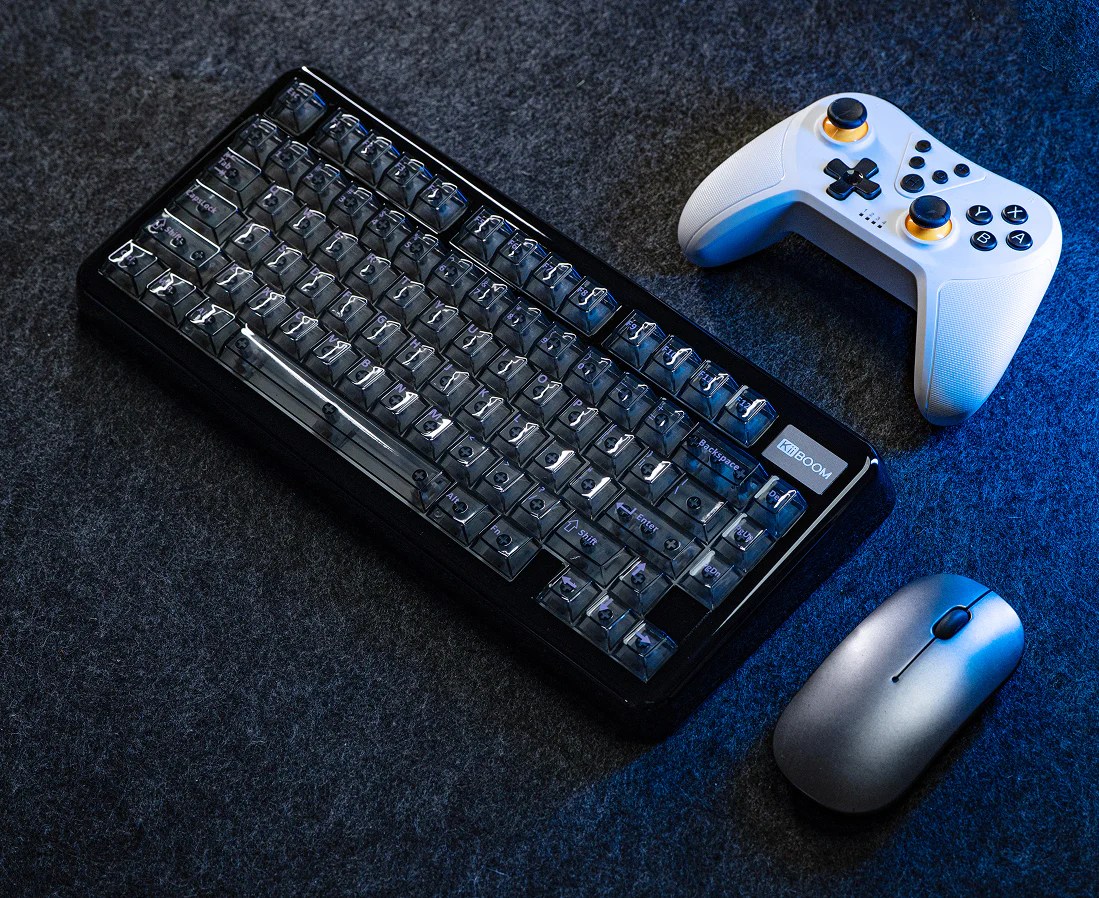
KiiBOOM continues to prove that it has the cutest collection of keyboards with the newest version of the Phantom81. This 75% keyboard comes in three colors: pink, clear, and black. I got my Phantom81 in pink because I love pink, but I am sure the other colors are cool too.

As always, you are getting a clean designed gasket that is both functional and aesthetically pleasing. The clear keycaps are cute, but they are designed for a comfortable tying experience. Each lights up with a beautiful and customizable back light for those who prefer the light light show, but it can just as easily be turned off for a more subtle keyboard experience. The semi-translucent body gives it that extra flare. Those cute little paw feet at the bottom are functional while maximizing the keyboard’s cozy aesthetic.

Comfort

The Phantom81 looks good while providing users a comfortable experience. The contoured keycaps feel good to the touch, while the switches give the soft typing experience needed for those long gaming sessions. The gasket design and the Pink Rose switches work together to create the iconic typing sound you want from a mechanical keyboard. While the keyboard does not have kickstands for adjusting the typing angle, the default angle is ideal for most users.

Perfomance

If you are looking for a keyboard that also compliments your gaming, the Phantom81 V4 is ready to deliver. The keyboard promises fast, low latency connections on all three modes: wired, wireless, and Bluetooth. It also has VIA support for a bit more versatility. Get ready to load it up with all the macros and speed run through all your activities! The 8000mAh battery will give you peace of mind on either of the wireless connections, but the high quality braided cable is there for you when you need it the most. For you crazies like me out there that consistently switch between devices, the keyboard suppord a wireless dongle and three Bluetooth 5.0 connections.

Sound Test

Review

I may be the biggest KiiBOOM fanboy at this point, but for good reason. KiiBOOM once again delivers a high quality product that looks good, feels great, and keeps up with all my gaming needs. If you are looking for an aesthetic upgrade, and have the means to splurge a bit, the Phantom81 V4 is a worth it every single time.

Quality

I have never had an issue with KiiBOOM products, even when my mailman destroys my package. This keyboard was very well packaged, in possibly one of the cutest presentations I’ve come across in my short career reviewing their products. The keyboard itself is well machined, without any visible signs of cheapness or imperfections. The keycaps are all clean and well injected, and they feel wonderful to the touch. The Phantom81 V4 looks and feels like a luxury keyboard, and perfect for those looking for a clean and cozy aesthetic.

Aesthetic

The Phantom81 V4 is perfect for those looking for a cute keyboard. The semi-transparent design is well executed, giving it a unique look and feel. The RGB looks good, and gives the keyboard its unique flare. Some people may not like the rave on their desk, but I am always a fan. The keyboard looks good with everything off, if that’s more your vibe. Speaking of vibes, the cute cat paws that keep the keyboard stable are adorable. While no one will ever see them, I like the fact that my keyboard has cat paws. (My daughter loves it too). This keyboard is clean and elegant, and ready to upgrade your aesthetic with its presence alone.

Performance

I have never had an issue with the a KiiBoom product, and I am happy to report that it didn’t start now. During my testing, I didn’t notice any ghosting or latency. The keyboard handled all my gaming (mostly Guild Wars 2) without much issue. Who else is excited for Guild Wars 3 tho?

Switching between connections was quick and seamless. I didn’t notice any reduction in performance between connections or devices. I didn’t play around with VIA too much outside of the few data entry macros I use for work, but setting those up was easy. I am sure anyone can maximize the keyboards utility with a bit more effort. The battery life is amazing, and I can’t really remember how many times I had to charge this keyboard. I think I got at least 10 hours of use with everything on, but I always lost track of time because it felt so long. The Phantom81 V4 is as reliable for gaming as the advertising suggests, and I am sad I need to move on to other keyboards.

Comfort

Usually when I try out keyboards, there is a period of awkwardness where I have to adjust to the new keyboard. The differences in layout, switches, keycaps, and size always take some getting used to. Sometimes, this means a painful day or two of adjustment, but I didn’t get that with the Phantom81 V4. I wouldn’t say this is an ergonomic keyboard, but it is ergonomic enough to keep my repetitive stress injury at bay for those long typing sessions. While my wife hated every minute of this keyboard, I appreciate the soothing thacky typing sound that comes unique to the phantom series. It is a little on the loud side, so be mindful of where you use it. Some folks are weird and don’t appreciate the typing ASMR like we do.

Conclusion

The Phantom81 V4 proves KiiBOOM is a brand that can deliver a cute aesthetic without sacrificing on quality or performance. If you are looking for a excuse to upgrade your aesthetic, here it is. This keyboard works great, but but will look even better on your desk. You can pick up your Phantom81 V4 from the official KiiBOOM store, or on Amazon through my affiliate link.

KiiBOOM Phantom81 Lite Review: Cute and Functional Keyboard

Disclaimer

KiiBOOM sent me the Phantom81 lite for free to review for my blog. While I am very grateful for the opportunity, I won’t let it sway my opinions. This will be my honest review. Make sure you also check out my review for the Phantom 98 lite and the Moonshadow V2. I’ll also be using my Amazon affiliate link where possible. Using it before you buy anything really helps me out.

Table of Contents

What’s in the box?

  • Phantom81 Lite
  • 3 Additional Switches
  • USB-C to USB-A Cable
  • Key/Switch Puller
  • Stickers
  • User Manual

Features

The KiiBOOM Phantom81 Lite is a 75% gasket-mounted mechanical keyboard. The keyboard comes with mochi switches which means it is ready to deliver the perfect typing ASMR. If you are looking for a cute keyboard to enhance your cozy setup but also delivers in both performance and comfort, check out the Phantom 81.

Aesthetic

The Phantom81 Lite is available in five styles: Pink, Green, Clear, Black, and Blue. I’ve gotten these in almost every color and have yet to be disappointed. KiiBOOM goes above and beyond to deliver an adorable high quality product that is ready to take on every kind of workflow.

Everything about the Phantom81 Lite has been curated to fit that unique cute cozy aesthetic you are striving for. From the rounded shape of the gasket to the shape and color scheme of the keycaps. The mono-color keyboards will sport the cherry profile key caps you know and love, but the themed ones will come with the unique MOA switches that give the keyboards added whimsy. No matter the version you end up getting, each keyboard comes with soft south facing backlight to give it some added flare.

Comfort

The Phanom91 Lite promises comfort and luxury with its unique gasket design. The natural typing angle is suitable for most users, but the included kickstands offer an option for those like me who prefer something a little steeper. The shape of the gasket also allows users’s hands to fall naturally over the keys. The Mochi switches give users a soft typing experience while providing the typing ASMR we all crave.

Performance

The Phantom81 Lite will prove itself more than just a pretty keyboard through its performance. Users will appreciate the low latency wireless connections from both wireless and through the included dongle. The 4000mAh battery offers users the peace of mind during raid night. Fortunately, the wired connection is even faster for when you eventually have to charge the battery. The Phantom’s low latency connection and customizability through QMK and VIA, this key board is ready to fit into any role.

Sound Check

Review

KiiBOOM continues to be my go to brand for mechanical keyboards. Not only do they manage to create keyboards that are aesthetically pleasing, they are high quality and comfortable enough to use with these old crippled hands. The Phantom81 Lite continues to be one of my favorite keyboards. If you are looking for a cute keyboard that works well for everything you need, the Phantom81 Lite is the keyboard for you.

Aesthetic

I’ve tried out almost every version of this keyboard, and I find it impossible to pick a favorite. For this review, I got to try out the clear version and it is fantastic. The opaque color makes it look so elegant, and the backlight makes it look adorable. I love the lighting effect as it shines through the clear body. All of the version’s I’ve tried have been high quality and look good, it all comes down to preference. The classic cherry switches are cool for those familiar with the layout, and while the MOA might take some getting used to, they are just as comfortable.

Quality

I have yet to be disappointed by the quality of KiiBOOM keyboards. I’ve gotten boxes that look like they were dropped from the plane they came on that work and look like nothing happened. Users will be impressed by how clean the manufacturing on the Phantom81 Lite is. Everything on this keyboard is so smooth and soft, and I am confident it will survive the more intense team fights in my future (as long as it isn’t thrown against the wall).

Comfort

I have a repetative stress injury that triggers when the keyboard’s ergonomics isn’t right. There are keyboards that ruin my hands, but I haven’t had an issue with KiiBOOM. Sure, there have been keybaords that have taken time to get used to, but I can get a respectable amount of use out of these keyboards without issue. While I wouldn’t buy the Phantom81 Lite for an ergonomic upgrade, the keyboard is comfortable enough for most cases. I’ve had keyboards that trigger my injury so bad I can’t use them, and it has never been a problem with the Phantom81 Lite. The keys are soft and typing angle is perfect.

Performance

The Phantom81 Lite was perfect for my workflow. I didn’t notice any ghosting, disconnecting, or latency. It survived my rigorous GW2 grind and my 9-5. The battery is amazing, giving me about 8 hours of continuous use without all the lights on. You can get even longer with everything off. Customizing the keyboard with macros was incredibly easy. Although I never get much use from this feature, it is nice to have for those data entry shortcuts I heavily rely on for my workflow. This will be the keyboard I will use between reviews if things ever slow down. The Phantom81 Lite has proven itself a reliable contender for your next keyboard.

Conclusion

If you want a keyboard that looks good, has all the keys you need, and is reliable, get yourself the Phantom81 Lite. This is easily one of my favorite keyboards from one of my favorite brands. It looks good in every color, and it works great out of the box. At this price point, you aren’t doing much better. Go get yours today.

You can pick up the Phantom81 Lite from the official KiiBOOM website, or on Amazon through my affiliate link.

Redragon BS8773 Review: Affordable Gaming Combo

Disclaimer

Redragon sent me the BS-8773 mechanical keyboard and mouse combo to review for my blog. While I am very grateful for the opportunity, I won’t let it sway my opinion. This will be my honest review. Make sure you also check out my reviews for the Wyvern K761. I’ll also be using my Amazon Affiliate link where possible. It really helps me out if you use it before buying anything.

Table of Contents

What’s in the Box?

  • BS8773 Mechanical Keyboard
  • Wireless Mouse
  • Wireless Dongle
  • USB-C to USB-A Cable

Unboxing

Features

If you’re a gamer on a budget but don’t want to sacrifice performance, Redragon might have the kit for you. The Redragon BS8773 comes to us with a few features that will help you stay competitive, even through those long sweaty team fights.

Design

This 78 key keyboard has been designed to give users access to all the keys they need in a compact and optimized package. This thin and ultra light keyboard comes in four colors: Black, White & Grey, White & Purple, and Blue. I got mine in Purple and love the color scheme.

The thin switch design makes the keyboard compact without sacrificing on any of that mechanical keyboard goodness. Most importantly, this wouldn’t be a gaming keyboard without RGB and the BS8773 has a very pretty blue backlight that will give your cave the flare you crave. The RGB can be turned off easily if you don’t want a light show.

Performance

If you’re looking for a keyboard that can handle you at your most intense, the BS8773 promises the performance to do just that. While the keyboard does not have Bluetooth, players can enjoy a low latency wireless connection through the attached dongle. Coupled with the keyboards impressive battery life (about 10-12 hours with all the lights on), you are getting a very reliable package for fantastic price.

The Mouse

The wireless mouse requires a AA battery, but it is ready to earn all those headshots as soon as it is installed. With 5 adjustable DPI settings (800/1200/1600/2000/2400 DPI), ergonomic design, and low latency connection, there is no task this combo can’t handle.

Sound Test

Review

If you are looking for a cheap, low profile keyboard/mouse combo for your daily grind, the BS8773 is fine for what it is. Don’t expect the most comfortable or luxurious experience, you’re getting a functional compact keyboard that does what it needs to. My favorite aspect of this keyboard is the mouse. The mouse is awesome and almost makes up for they keyboards drawbacks.

Quality

Out of the box, users might feel some initial disappointment. The keyboard has a cool, simple modern aesthetic, but the font on the keys already look faded. Picking up the keyboard I realized that the box it comes in is heavier than the actual keyboard. This is ideal for those who travel with their kit, and fine for those who don’t. There is some flex to the board which makes me anxious about traveling with the keyboard. I heard some odd cracks when I was testing the flex, but luckily nothing broke. The keyboard itself is made well enough. Everything is cleanly manufactured, although it does feel like cheap plastic. If you’ve never used a more expensive keyboard or keycaps, its fine for 40$. You can definitely do worse.

Aesthetic

The BS8773 has a very cool design. It is a very modern looking keyboard and the compact layout is ideal for the user who wants a full sized keyboard that doesn’t take up so much desktop space. The flat design makes it low-profile which is in step with its modern aesthetic, but I prefer something a bit more raised for comfort. The keyboard does have kickstands to adjust the height, but it isn’t tall enough for my tastes. This is a personal issue, but something to consider if you’re crazy like me. I love the color scheme, purple is my favorite color, but I can’t read the font on the keys. I know how to type without looking at the keys, but the font messes with my dyslexia and it is too faded looking for these tired old eyes. The BS8773 does have a very pretty blue backlight, and it isn’t the worst looking keyboard you’ll pull out at the LAN party.

Performance

All in all, I was very impressed with how well this little keyboard came to play. I noticed no latency, ghosting, or any other issues. Everything hooked up on the first try, and nothing malfunctioned in my week of vigorous testing. It was a solid workhorse for writing, but I found the layout a bit of an adjustment for gaming. I needed to relearn a lot of the muscle memory and it all felt too cramped. The experience got better the more I used the keyboard, but I had a rough couple of days getting used to the new echo system. I also didn’t like that keyboard connected through the dongle. I switch between devices constantantly for my workflow, so it was a little annoying to have to transfer the dongle. If you don’t need to move from one device, it isn’t an issue. The battery life is fantastic though, and honestly the best part of the whole package.

Comfort

It took me a couple days to get used to the Redragon BS8773, and in that time I almost gave up on the keyboard. Everything felt so cramped it would trigger my repetitive stress injury to the point where I needed to take breaks. However, once I got used to the layout, it was fine. For writing, this keyboard is solid. It works as intended and I could knock out long meaningful sessions without issue. For gaming, I constantly found myself fat-fingering the wrong key and messing up crucial combos. This is honestly a skill issue, and your millage will vary. I think this keyboard would be better if it didn’t include the function bar behind the macros. That said, it was comfortable enough to be worth the $40 as a daily workhorse.

The Mouse

The mouse in this kit is fantastic. Are there better mice out there? Of course there are, but for the price, you get a sleek comfortable mice that works well enough for what you need it for. My only complaint is that the thing is battery powered. I never seem to have batteries when I need them the most, and that scares me. You can buy rechargeable AAs (and I recommend you do) so I guess it isn’t a huge deal. This is probably one of the few times where the mouse messed up my hand less than the keyboard. I recommend it.

Conclusion

Look, times are tough and you shouldn’t be punished if you are gaming on a budget. The kit isn’t the high end devices the pros use, but most of us aren’t performing at that level anyways. If you are looking for something cheap that works well enough to get through your next game or that next essay, the Redragon BS8773 is a great value at $40. You can pick up the Redragon BS8773 directly from the Redragon shop, or on Amazon through my affiliate link.

KiiBOOM Phantom 98 Lite Review: Adorable & Functional

Disclaimer

KiiBOOM sent me the Phantom 98 Lite mechanical gaming keyboard to review for my blog. While I am very grateful for the opportunity, I won’t let it sway my opinions. This will be my honest review. Make sure you also check out my reviews for the Moonshadow V2 mechanical keyboard and the Cypher 29 gaming keypad. I’ll also be using my Amazon Affiliate link where possible. It really helps me out if you click on it before you buy anything.

Table of Contents

What’s in the Box?

  • Phantom 98 Lite
  • Dust Cover
  • Stickers
  • Branded Cleaning Cloth
  • 2 x Extra Switches
  • USB-C to USB-A Braded Cable
  • Wireless Dongle
  • 6 x Keycaps
  • User Manual

Unboxing

Features

If you’re looking for an adorable frog themed mechanical keyboad that not only looks good, but is also packed with utility, check out the KiiBOOM Phantom 98 Lite.

Aesthetic

Kiiboom once again proves why it is the best looking brand when it comes to high end feeling affordable mechanical keyboards. The newest color of the Phantom 98Lite, the adorable frog themed green, is sure to make a splash against any backdrop. This addorably themed keyboard features 97 swappable keys. The Moa profile keycaps not only enhance the keyboard’s cuteness, but provide the user with a comfortable typing experience. These dye-sub PBT keycaps have been manufactured to stay looking great, even through your sweatiest team fights. As a nifty little feature, the wireless dongle is securely stored under a cute magnetic frog themed plate that ties the whole look together rather nicely. Now, this wouldn’t be a gaming keyboard without a little RGB. The beautiful south facing rgb, that you can of course switch off if you don’t want to enjoy the light show.

Comfort

The Phantom 98 Lite comes out of the box with the ideal typing angle for most users, but the adjustable kickstands are ready for those like me who prefer a steeper angle. The layered gasket design is designed with enough sound dampening to keep your neighbors from beating down the door during your midnight raids. The keyboard is currently available with the Mossy Silent switches, with Mochi switches planned for late April for those who prefer a little typing ASMR. The switches are soft the reduce typing fatigue, and the Moa keycaps are contoured to make typing feel extra delightful.

Performance

This gaming keyboard promises low latency connections for both its wireless and bluetooth connections. The Phantom 98 lite can switch between 5 different connections quickly and easily. Gamers can enjoy a healthy gaming session with the impressive 8000 mAh battery. When the battery eventually runs out, gamers can enjoy the snappy wired connection with the included braided cable. Best of all, the keyboard offers official support for both Mac and Windows devices, and even includes extra keycaps for those who don’t want the windows keys. Most importantly, the Phantom 98 lite is VIA compatible for additional utility. Users can easily remap, rebind, and program useful macros to improve their workflow.

Sound Test

Review

If you are looking for keyboards that fit a cute cozy aesthetic but are also backed by their quality, then you are looking at KiiBOOM. I have yet to be disappointed by one of their products, and the Phantom 98 lite is no exception. This keyboard is not only the cutest thing to hit my table, but it is one of the most comfortable. If you are looking for something affordable and like the frog aesthetic, get yourself the Phantom 98 lite.

Aesthetic

This keyboard is adorable. I love the cute frog theme and the color. The keyboard has all of the keys I need for my workflow without feeling too big. I don’t really use Mac devices, but I appreciate that I have the option to swap out the windows keys if I’m feeling froggy. Most importantly, the high quality of the keyboard makes it very good option for those trying to upgrade their aesthetic.

Quality

Out of the box, this keyboard feels like it is more expensive than it is. The keyboard comes in fun, clean packaging that makes it feel like a premium product. The gasket does have a little flex to it, but nothing that is noticeable when typing. It is cleanly machined like the keycaps and switches. The keycaps are all printed very cleanly with a clear and legible font. Sometimes, these cutesy themes use fonts that are hard on my dyslexia, but not today. The printed images are all cute, and none of it feels like it will fade or smudge in the near future. Eventually, you will have to replace the keycaps, but luckily everything is easily swappable. At this price point, you aren’t really doing better.

Performance

The keyboard worked great. I did not notice any ghosting or malfunctions in my two weeks of testing. The connections were fast and responsive, and I was able to do my GW2 grind comfortably and without issue. Battery is excellent and I was able to get about 8 hours of continuous use out of the box, and about the same after the first charge. I did add a few shortcuts I needed for work through VIA. The process is easy and it gives the Phantom 98 lite it’s versatility.

Comfort

Comfort is where I have my first issue with the keyboard. It isn’t the most uncomfortable keyboard I’ve used, but I wouldn’t get this keyboard if you need better ergonomics. I have a repetitive stress injury that flares if the ergonomics are not right, and unfortunately, the Phantom 98 lite triggers it. This is a problem that is unique to me and other people with similar hand issues, normal people won’t notice the pain. The keyboard is comfortable enough to get a good amount of work done, but I am left with some soreness. If you aren’t suffering from a similar injury, the keycaps feel really good to the touch, the switches are light, and typing angle is excellent.

Conclusion

The KiiBOOM Phantom 98 Lite is an excellent keyboard for those who want a cute frog themed keyboard that works well and is high quality. My only complaint is that I don’t have access to dial for volume controls, but the keyboard has built in shortcuts to mitigate its absence. If you don’t need special ergonomics and like the design, you are getting a high quality cute keyboard that you will absolutely fall in love with.

You can pick up the KiiBoom Phantom 98 lite on the official KiiBOOM store, or on Amazon through my affiliate link.

Unboxing the RK C98 Magnetic Gaming Keyboard: An Honest Review

Disclaimer

RK Gaming sent me the Royal Kludge C98 Hall Effect Magnetic switch keyboard to review for my blog. While I am very grateful for the opportunity, I won’t let it sway my opinions. This will be my honest review. I will also be using my Amazon Affiliate link where possible. It really helps me out if you click it before buying anything!

Table of contents

What’s in the Box?

  • C98 HE Magnetic Keyboard
  • 4 Additional Switches
  • USB-C to USB-A Cable
  • Keycap/Swtich Puller
  • Dust Cover
  • USer Manual

Unboxing

Features

The RK C98 HE Magnetic Keyboard promises to be the only option for serious gamers. If you are delving into the deepest dungeons for the rarest of loot or trying to top the leader board with your unrivaled KD ratio, you are going to want to keep the C98 on your radar.

Aesthetic

The C98 is a 96% keyboard. That means you’re getting a numbpad and a function row to maximize your workflow. The cherry profile switches give it that classic clean feel, but the well machined gasket give its modern flare. All 98 keys are lit with soft, customizable RGB to emphasize the fact that the C98 is made for gaming. The keyboard comes in a green and white color scheme that is ready to pop against any modern setup.

Comfort

The C98 features a three layer, sound dampening gasket. It dampens the sound just enough to give players that satisfying imput sound without getting too distracting. The layout has been designed to fit most hands for comfortable, long gaming sessions. The switch sensitivity can be easily customized to reduce that dreaded finger strain.

Performance

The C98 comes with the features all gamers need in their arsenal. This is a wired keyboard that promises to deliver the lowest latency experience. All switches are customizable and remapable with some cool added features to take your game to the next level. The C98 has a rapid fire trigger, DKS, MPT, Mt, TGL, and SOCD functions. Note that some games don’t allow these features, so use them wisely. As an added bonus, you can customize the imput sensitivity for a truly personalized experience. All these features can be easily managed through the web-based software.

Sound Test

Review

As far as magnetic keyboards go, the RK C98 is pretty mid. The keyboard isn’t terrible, but when you compare to something like the Epomaker HE75, it falls a little flat. The keyboard looks cool and has solid performance, but there is a cheapness that ultimately makes it hard to recommend.

Aesthetic

The C98 is a very cool looking keyboard. The colors cheme is fun, withe the perfect spash of color to make it pop. The machining looks clean, and the key caps look like they will survive some intense gaming. If you are looking for a cool looking keyboard, you might want to consider the C98, but it isn’t the best feeling keyboard you’ll get at this price point.

Comfort

It took me a bit of time to get used to the keyboard. The keycaps are cheap, and they feel it. Every press felt like I was tapping against cheap brittle plastic. Something about the switches and the position of the keys triggered my repetative stress injury almost instantly. It went away after a couple of days, but I still felt some soreness after long sessions. Now this is a very personal problem. My condition requires specific ergonomics, and the C98 doesn’t have enough of it. It is not unusable by any means, but I am on my computer for too long where I can’t ignore this flaw. This shouldn’t be a problem for people who game or work on their computer a normal/healthy amount. If you are looking for better ergonomics, I would skip to something like a split keyboard, but everyone else should be fine.

The Sound

The typing sound is another issue I have with the C98. As far as keyboards go, the C98 has one of the worst sounds I’ve come accross. This keyboard produces a loud cheap sound that is hard to ignore. I prefer a more thacky sound, and would have preferred this keyboard be silent. My wife was definitely not a fan either, but she also doesn’t like any typing sound to be fair. If you’re interested in getting a keyboard for the typing ASMR, the C98 is not the move.

Gaming

The C98’s gaming features are arguably what makes this keyboard an attractive option. I like that customization software is web based and that I didn’t have to download another program to manage my devices. The C98 offers some decent customization options. I was able to program some useful macros that helped speed up my workflow, and I like how I can customize the actuation to fit my hand a little better. I don’t believe the C98 gave me an unfair advantage, but I did feel like I was doing better at hitting my skill rotation.

The C98 also supports programs like rapid fire trigger, DKS, MPT, Mt, TGL, and SOCD functions. I didn’t mess around too much with these features because I live on the more casual side of the scene, but it is nice to have for those who need it. Setting up these features is super easy.

Performance

The C98 performed a lot better than I expected. After the initial shock of the feel wore, and I got used to the keyboard, I felt like it handled my gaming better. Out of the box, without any customization, the C98 feels very snappy and reliable. I was hitting all my jumps in platformers, my skills in mmos, and pulled off some sweet combos in the one fighting game I keep around for testing.It wasn’t a life changing improvement, but that might just be a skill issue. I don’t care for the added wire clutter or the fact that I can’t switch easily between devices without moving plugs, I understand the need for the wire connection. For the lowest imput latency, you want a wired connection. During my testing, the connection felt fast, and the keyboard worked as intended.

Conclusion

If you are looking for a solid gaming keyboard with a good amount of features, the C98 is a solid upgrade. I wouldn’t get this keyboard if you’re trying to get better ergonomics, but most people would do fine with the C98. I would probably get better keycaps for a better typing feel, but it will do the job in a pinch.

You can pick up the RK C98 HE magnetic keyboard on the official RK Gaming site, or on Amazon using my Affiliate link.

Epomaker Galaxy100 Lite Review: Solid Keyboard or Just Average?

Disclaimer

MechLands sent me the Epomaker Galaxy100 Lite to review for my blog. While I am very grateful for the opportunity, I won’t let it sway my opinions. This will be my honest review. Make sure you also check out my reviews for the Mechlands Vibe108 and Vibe99 mechanical key boards.

Table of Contents

What’s in the box?

  • Galaxy 100 Lite
  • Wireless Dongle
  • USB-C to USB-A Braided Cable
  • 2 Additional Switches
  • Mac Keycaps
  • Key/Switch Puller
  • User Guide

Unboxing

Features

The Epomaker Galaxy100 Lite promises to be the only mechanical keyboard you need. Whether you need a work horse to carry you through that 9 to 9 grind or a reliable tool to get you through the next raid, this keyboard is ready for any task.

Aesthetic

The Galaxy100 lite is a full sized keyboard available in two colors: Yellow and Black. I have it in yellow, and it has a classic feel for those that like the aesthetic, but the black is a stylish little upgrade for any aesthetic.

The keyboard has 100 keys and knob. The keys are all lit with dynamic and customizable RGB to make it a true gaming keyboard. Its aluminum frame makes it sturdy, but gives it its classy feel. If you are looking for a keyboard that is simple and gets the job done, the Galaxy100 Lite is a strong contender.

Comfort

The Galaxy100 promises comfort with its ergonomic design and soft mechanical switches. The typing angle is fixed at 7 degrees, but this is fine for most users. The 5 layer gasket mount muffles enough of the noise to keep the neighbors happy without taking away from any of that thacky goodness. Enjoy comfortable typing sessions with a stable, sturdy keyboard that feels good to the touch.,

Performance

The Galaxy100 lite is ready for any workflow. Whether you are looking at high level competitive play or just need something to type out your next novel, the Galaxy100 Lite does it all. With a low latency connection in both wireless and Bluetooth connections, users can enjoy high performance without any of the wire clutter. The impressive 8000mAh battery promises 39 hours of use with all the lights one. That means you don’t have to worry about your keyboard dying when you need it the most. But for those who want enjoy the lowest latency, the high quality braided cable is ready to deliver the performance you need.

Sound Test

Review

The Epomaker Galaxy100 Lite is an average full sized keyboard. While you can definately do worse at this price point, you can certainly do better. If you need a full sized keyboard, you’re better off with the Vibe108.

Quality

The Galaxy100 Lite looks good out of the box. The aluminum frame is well machine and gives it the sturdy heft that will keep the keyboard from sliding all over your desk. The keycaps are clean and feel good to the touch. The lettering is legible and it doesn’t feel like it will wear off. The keyboard looks like a more expensive, albeit retro looking keyboard. However, the aesthetic is a bit of an acquired taste.

Aesthetic

The Galaxy has a classic feel, and the yellow scheme makes it look like a thrifted keyboard with a bit of a modern flare. The problem with the aesthetic, it isn’t going to fit in every setup. The keycaps and switches are easily swapable, but might as well buy a full sized keyboard with a scheme you like. I wasn’t too crazy about the look, and even less crazy about the typing experience.

Comfort

The typing experience is average at best. I got my keyboard with the Marble White switches, and I can honestly say I prefer the Wisteria switches. The switches feel heavy and left a bit of fatigue after each extended use. The sound is also a bit too crunchy. If you are getting this keyboard, I recommend starting with the Wisteria switches. The Wisterias are awesome. Otherwise, the typing angle is fine and I never felt like it destroyed my hands, but I did need to take breaks. Note that I do have a repetitive stress injury that flares when I don’t have the right ergonomics, and this keyboard just didn’t have enough. Get the Vibe108.

Performance

The keyboard’s performance is the only thing saving it from a bad review. The keyboard works as intended. I could handle my casual level of gaming and MMO grind without performance issue. There was some fatigue, but not enough to make me stop. The impressive battery life gave me about the advertised 40 hours of use on a single charge, and that is nothing to scoff at. If you like the aesthetic and want something that will work, the Galaxy100 Lite is a solid choice.

Conclusion

Honestly, if this was the first full sized mechanical keyboard I ever used, I wouldn’t noticed the issues. Having used better keyboards like the Mechlands Vibe108, it gets hard to recommend. It all comes down to whether or not you like the aesthetic. If you like the retro feel of the keyboard and the yellowed color scheme, the keyboard works well enough and is comfortable enough to be worth the price tag. However, if you are looking for a good full sized budget keyboard, you have better options. Check out the Mechlands Vibe108.

You can pick up the Epomaker Galaxy100 Lite from the official Mechlands store, or AliExpress.

Is the TH108 Pro Worth It? An Honest Review

Disclaimer

Mechlands sent me the TH108 Pro mechanical keyboard to review for my blog. While I am very grateful for the opportunity, I won’t let it sway my opinions. This will be my honest review. Make sure you also check out my reviews for the Mechlands Vibe 108 and Vibe 99 Mechanical Keyboards.

Table of Contents

What’s in the box?

  • TH108 Mechanical Keyboard
  • USB-C to USB-A Braided Cable
  • Key/Switch Puller
  • 2.4 Ghz Wireless Dongle
  • 2 Extra Switches
  • Manual

Unboxing

Features

The Epomaker TH108 promises to be the last full-sized keyboard gamers need. This stylish keyboard will not only upgrade your aesthetic, but has the features and performance to upgrade that young productivity.

Style

The TH108 Pro comes in three fantastic colors: Black, Blue/White, and Pink. I got mine in pink, but I wouldn’t mind collecting all of the colors.

This fullsized keyboard has 104 keys of swapable cherry profile switches. Each key is lit with customizable RGB, but you can always turn if off if for longer battery life. The TH108 comes with either the Creamy Jade or Sea Salt Silent switches. You’ll want the creamy switches for that disarable typing ASMR, and the Sea Salts if you prefer to sit with your own thoughts. The clean machining give the keyboard its classic feel, but the customizable LED screen and unique volume dial placement give it a modern flare. The fun schemes make it stand out against any setup.

Comfort

Epomaker strives for ergonomic design with a TH108 Pro‘s ideal typing angle. This keyboard does have kickstands for those of us who prefer something a little steeper. The five layer gasket design helps dampen some of the sound without completely eliminating it (unless you get the Sea Salts). Both switches promise a soft and satisfying typing feel that is ready to perform when you need it.

Performance

The TH108 Pro is an easy upgrade for any gamer in need of a full sized keyboard. The 104 switches are designed for low latency performance, with a bit of anti-ghosting protection for when you need it. You have additional switches if any ever fail. The fast wireless connections are perfect for the gamer who wants to reduce wire clutter, but the unbeatable wired connection is always ready for your next raid. Most importantly, the 4000mAh battery boasts a 40 hour life with everything on (200 with everything off) so you don’t have to worry about your keyboard dying mid raid. The handy, customizable LED screen will keep you on top of your battery life so it is never a surprise.

Gimmicks

What makes this keyboard Pro is the customizable LED screen. The screen shows users useful information like date, time, and battery life, but it can be customized with a GIF for some added personality. The side facing volume dial is in the perfect position for easy use.

Sound Test

Review

The TH108 Pro is a solid keyboard for those who need a full sized key board and want the LED screen. Otherwise, you can make do with just the TH108.

Aesthetic

I received my TH108 Pro keyboard in black, and I love the color scheme. The black makes it look like a classic keyboard, but it has a bit of color accents to make it pop. All the colors look cool though, and I wouldn’t mind it getting the other colors. Looking at you pink. The side facing dial is my favorite feature of this keyboard. It not only looks good, but it feels a lot more natural when tuning my volume. It has definitely ruined normal dials for me. The LED screen make the keyboard look very modern. It will definitely stand out and get you some compliments.

Quality

Out of the box, the keyboard is fine. The machining is solid, and everything looks clean. It is a little on the lighter side so there is a bit of flex, but if you aren’t traveling with it or throwing it around, it’s fine. It looks high quality, and feels good for the price.

Gimmicks

The main selling point for this keyboard is the LED screen. The LED screen is useful, especially for staying on top of your battery life, but I always forget I have it. I don’t even bother customizing the screen with a GIF because I never look at it. For those who want to have that flare and quick access to that information, it works and it is easy to customize. I personally don’t care for keyboards with screens, but I don’t mind having them.

Performance

The keyboard works great. I didn’t notice any ghosting or latency in my testing. The keyboard also has a respectable battery. I got about 40 hours on a single charge with everything on. It did good enough with my MMO grind, and a lot of the indie games I review for this blog. If you need an affordable full sized keyboard that just works, the TH108 Pro can handle whatever you throw at it.

Comfort

The TH108 Pro took some getting used to. The switches feel a little heavy, which caused a bit of fatigue. Not enough to force me to stop typing, but enough to notice some discomfort. I have some hand injuries that require special ergonomics so your mileage may vary. If you need special ergonomics in your full sized keyboard, I would get something like the Redragon Wyvern. The function bar is also not lined up with the number row which made it a little awkward to use in gaming. I never got used to it, and it made the size a little useless. I get the full-sized keyboard for gaming because I need the function bar for Guild Wars. I am sure if I stick with it I can get used to it, but it just feels more efficient to rebind my actions to not use the function bar.

Conclusion

The TH108 Pro is a solid keyboard. It isn’t anything I would rush to, but if this is our budget and you want an LED screen, you aren’t doing much better. This is a keyboard that does just enough. It is comfortable enough to get those long sessions of gaming in, and it works fast enough to keep you competitive. I wouldn’t get this over the TH108 as a matter of taste, but there is nothing wrong if you want a little GIF to spice up your day.

You can pick up the Epomaker TH108 Pro, and other keyboards like it, on the official Mechlands store.

Exploring the Features of Redragon Wyvern K761: Comfort and Performance

Disclaimer

Redragon sent me the Wyvern K761 Pro to review for my blog. While I am very grateful for the opportunity, I won’t let it sway my opinions. This will be my honest review. Make sure you also check out my review for the Galatin Pro K719 and Antonium K745 Pro mechanical keyboards. I’ll be using my Amazon Affiliate link where possible. It really helps me out if you use it before buying anything.

Table of contents

Unboxing

What’s in the box?

Features

The Redragon Wyvern K761 is a full sized keyboard with the features all gamers need at a price no one else can beat. If you are looking for a reasonable upgrade that looks good and will elevate your game, the Wuvern K761 might be what you’re looking for.

Aesthetic

The Wyvern K761 Pro comes in two colors: Jade Cloud and Abysal Blue. I got mine in Jade Cloud, but the choice depends on what fits your aesthetic better.

Both colors feature the customizable LED screen and a knob for onboard media/volume controls. The round pbt give the keyboard its unique look, while supplying users with a comfortable typing experience. The linear Mint Mambo switches make typing soft, but give it that satisfying thacky sound you want in a mechanical keyboard. Each key is lit with a customizatble RGB that shines through the keycaps for a bit of added flair. The keycaps and switches are easily swappable if you ever decide to change up your aesthetic.

Comfort

The Wyvern Pro has a five layer gasket design that provides enough noise dampening to keep that sweet typing ASMR at a respectable volume. Loud enough for you to enjoy, quite enough for the house to sleep. The adjustable kickstands give users the option to find the ideal typing angle, although the default should be good enough for most users. The round PBT give the keyboard its soft and satisfying feel, and the mint mambo switches give it its comfort.

Gimmicks

The Wyvern Pro features a customizable LED screen. It displays useful information like battery life, date, and time, but can also be customized to feature one of your favorite gifs. This can be easily customized through the official software found on the product page. The keyboard also has a useful dial for volume and media controls.

Utility

This budget mechanical keyboard has a respectable amount of utility. Each of the 104 keys can be rebound or reprogrammed with useful macros through the official software. The software can also change up the RGB for some added customization. The fast/low latency wireless connections make it ideal for the gamer who wants to reduce that wire clutter, and the respectable 4000 mAh battery keeps that wire away unless you really need it. Users can switch between connections easily with the the onboard switch, and there is a mac switch for those who need it. The K761 bundles a lot of value in a very affordable package.

Sound Test

Review

The Wyvern K761 gives a very respectable performance at an unbeatable price. If you are looking for a full sized keyboard that will handle most workloads, you can count on the K761.

Quality

I was a little disappointed at first. My mailman played soccer with the box, leaving it mangled and its contents out of place. All of the contents spilled out when I did my opening, and I was worried they keyboard wasn’t going to work. At this price point, they tend to break with the slightest pressure. The keyboard and the contents looked fine. The keyboard is well machined, although cheap feeling and plasticky and the extra switches although scattered, work. After a week of using the keyboard, I can attest that the quality is solid. Everything works despite the lack of care for my postman.

Aesthetic

I got the keyboard in Jade Cloud because I like the fun mint green color scheme. In person, the colors are good, but the font is a little hard to read with my dyslexia. It isn’t a huge problem, but the font looks cheap with the lights off. With the lights on, the keyboard looks a lot cooler, but there are some letters that look strange. For $75 tho, they look fine and will look cool against any setup. You can always upgrade them down the line if you really want to.

Comfort

I was not expecting the Wyvern Pro to be as comfortable as it is. It took no time to get used to this keyboard, and I could use it all day without issue. The rounded keycaps give the keyboard a satisfying and comfortable feel. The mint mambo switches are very soft and they give off the perfect typing ASMR. I love how this keyboard sounds, but it is a little loud. I had to be careful or else I would wake up the baby in the other room. However, if you are looking for a keyboard with that sweet thacky goodness, the Wyvern K761 is perfection!

Performance

I am always worried when testing these cheaper keyboards because there is always a chance they come defective. I’ve gotten my share of defective ones. The K761 had no issues out of the box, nor did it show signs of failing. I was able to do some meaningful raids and dailies in my MMO grind without issue, and it handled my day to day just the same. The battery is incredible! I got about 30 hours on a single charge, and that is with all the lights on.

Gimmick

The more keyboards I get with LED screens, the more I appreciate them. I like being able to see how much battery I have left on a charge, but other than that, its useless. Setting up the GIF is easy, and it adds a little flare to your setup. I usually forget about the GIF after setting it, but its nice if you like to theme your aesthetic. The volume dial is fantastic. It has a smooth and responsive glide, and it lets me pause my media (even if its in the background).

Conclusion

If you only have $70 to upgrade your setup, the Wyvern K761 will get the job done. This is a good looking mechanical keyboard with enough utility packed into a respectable package. You can buy a more impressive looking keyboard at this price point, but you will be losing out on the comfort and performance. I definitely recommend it.

You can pick up the WYvern K761 on the official Redragon store, or through Amazon using my Affiliate link.