Category Archives: Tech Reviews

KiiBOOM Cybrix29 Review: A Gamer’s Ultimate Keypad

Disclaimer

KiiBOOM sent me the Cybrix29 Gaming Keypad to review for my blog. While I am very grateful for the opportunity, I won’t let sway my opinions. This will be my honest review. Make sure you also check out Elyxirine Pastel Y2K Keycap Set and the Jade75 mechanical keyboard. I will also be using my Amazon Affiliate link where possible. It really helps me out if you click it before you buy anything.

Save big during KiiBOOM‘s special sale from now until November 12!

Table of Contents

What’s in the box?

  • KiiBOOM Cybrix29
  • Key/Switch Puller
  • USB-C to USB-A Cable
  • User Manual

Features

The Cybrix29 is a 29 key wired gaming keypad that is ready to take on any task. Whether you are looking for tool to upgrade you workflow or just want something pretty to set on your table, the Cybrix29 is a fantastic solution.

Aesthetic

The Cybrix29 has a clean modern design, built to the high quality KiiBOOM standards has set for the industry. The low profile aluminum body not only looks good, but will keep your desk a bit more clutter free. They Cybrix29 is available in three colors: pink, silver and black. I chose to review it in pink, but it was a very tough choice to make.

The three dials give the keypad both its utility and modern flare. The RGB lighting effects helps illuminate your setup. The Cybrix29 features three separate RGB systems that can be easily customized through onboard commands. Each of the 29 keys, the light bar on top, and the acrylic base have separate customizable RGB profiles. Users can change the brightness, lighting effects, speed of the effects, and the color of each profile. As an added bonus, the keycaps and switches are easily swappable for maximum customization.

Comfort

The Cybrix29 promises a comfortable typing experience. The cherry profile keycaps give it its ergonomics, while the duskrise magnetic switches give it that satisfying soft feel. Whether it be a long gaming session or a bit of editing, your hands can rest easy with this powerful keypad.

Performance

The Cybrix29 is KiiBOOM’s ultimate solution for form factor utility. Each of the 29 keys is fully customizable. Each key and dial can be easily remapped or reprogrammed to take on any task. Users can also adjust the sensitivity and actuation of each switch for a more personalized experience. The Cybrix29’s advanced functions like the Snap Key (SOCD) and Dynamic Keystroke (DKS) support give its users a competitive advantage, so long as the game allows it. Don’t get banned.

Most importantly, the keypad’s wired connection give it the high speed, low latency connection needed for competitive gaming. With a very respectable 8KHz polling rate and no battery to slow its users down, the Cybrix29 is ready to master any game or assignment that gets in its way.

Sound Test

Review

If you are looking to upgrade your game, or a tool to help your productivity, the Cybrix29 is the perfect tool for you.

Looks

KiiBOOM is a master of creating aesthetically high-quality keyboards, and the Cybrix29 is no exception. The keypad is very well made with a light weight design that makes it perfect for travel. The colors are all bright and the lettering is clear. The quality of the keycaps gives me confidence that it won’t fade in the near future. The RGB makes the keyboard fun. The colors are vibrant, and the customization options give the keypad its versatility. There is a Cybrix29 configuration for every setup.

My only complaint is that it is a wired connection. I don’t like having too much wire clutter, but it is the price to pay for a high speed low-latency connection. However, it is a price I am willing to pay because this keypad is a beast of a machine.

Performance

If you are looking for a tool to give you a competitive edge or just want a more comfortable gaming experience, the Cybrix29 is a fantastic upgrade. The wire connection gives the keypad its negligible latency. You might need to do a bit of remapping, but the keypad has most of the keys you need for the games you play. I end up remapping a lot of what I play, so it wasn’t a huge deal.

The Cybrix29 features a fantastic out of the box experience, but being able to remap and reprogram the keys is nice to have and easy to do. The adjustable actuation and sensitivity as well as the advanced features (Snap Key (SOCD) and Dynamic Keystroke (DKS) support) make it a very powerful gaming tool. I didn’t feel the need to make any adjustments, but they are available for those who need it. Just make sure the game allows it first.

Although I don’t have a real way to test it, the Cybrix29 has the potential to be a powerful macro pad. The three dials are very handy for editing, and being able to remap everything certainly has its value. If you are looking for a powerful daily driver that looks good and is low profile, check out the Cybrix29.

Comfort

The most important feature of any keyboard is its comfort, and the Cybrix29 is comfortable. The keycaps feel great, and the switches have enough resistance to not only be satisfying, but they don’t create any fatigue. I was able to game for long hours without any hand pain. The sound is loud enough to be satisfying without being overbearing. My wife appreciates that it doesn’t fill the house with the thacking I love so much.

Conclusion

I love the Cybrix29 and it will be my daily driver for my main games. I have it configured just right for Guild Wars 2, and with the new expansion out, I am going to be spending a lot of time in Tyria. A keypad this size is a great option for those who need a macropad to play with, or for those who don’t want to buy a full sized keyboard. The size makes it a functional gaming peripheral, and its design makes it easy to store. It is also a very good for travel, if you don’t want to carry a full sized keyboard. With a bit of tinkering, the Cybrix29 can handle any game and task, making it the perfect tool for those who need it.

You can pick up the Cybrix29 on the official KiiBOOM store. They are currently having a huge sale until November 12, so now is the perfect time to pick up this or any of the other fine KiiBOOM products. You can also pick it up on Amazon through my affiliate link, but it is cheaper on KiiBOOM during the sale.

Is the Epomaker RT85 Worth It? In-Depth Review

Disclaimer

Epomaker sent me the RT85 mecchanical keyboard with the Wisteria V2 linear switches to review for my blog. While I am very grateful for the opportunity, I won’t let it sway my opinions. This will be my honest review. Make sure you also check out my reviews for the Epomaker Galaxy100 Lite and the TH108. I will also be using my Amazon Affiliate link where possible. It really helps me out if you use it before you shop for anything.

Table of Contents

What’s in the box?

  • Epomaker RT85 Mechanical Keyboard
  • USB-C to USB-A Braided Cable
  • 2.4Ghz Wireless Dongle
  • 2 Additional Switches
  • Key/Switch Puller
  • User Manual

Features

Epomaker has dropped the RT85 mechanical keyboard, and its unique design is ready to upgrade any setup. The RT85 comes in two flavors, Grey and Green, with either the Wisteria V2 Linear switches or Creamy Jade switches. This review will be on the Wisteria switches.

Design

The RT85 is a compact 75% keyboard, which is the perfect size for most workflows. All 82 keys are comfortably supported by one of two patent switches: the wisteria or jades. The difference is the sound, witch wisteria giving off more of a thack while the jades give a smoother creamier sound. The choice is all up to preference. Each switch and high quality keycap is easily swappable for when you are ready for a change in aesthetic.

This compact mechanical keyboard has a respectable 5 degree typing angle, but can be adjusted to 6.7 and 10 degrees. While the native is nice, I do prefer the steeper angler personally. Speaking of comfort, the wisteria switches offer just enough resistance to offer a satisfying amount of feedback with each keystroke. The actuation can be personalized for added comfort.

The Epomaker RT85 sports a unique design. Users will appreciate the retro aesthetic and two impressive color schemes. The green white gives it an army vibe, and the white grey has the splash of color to brighten up any setup. The keyboard also has a few gimmicks that help set it apart from others in the market. The magnetized plate helps hide the 2.4Ghz dongle neatly, the customizable LCD screen shows useful information, and there it uses a dial to switch between connections. My favorite feature is the joystick used for volume and rgb controls. Epomaker got very creative with the RT85, but it has enough function to make it worth some consideration.

Performance

The RT85 has supports a high speed, low latency wireless connection, boating up to 1000HZ polling rate. The 8000mAh offers users with up to 320 hours with everything off, or up to 24 hours with everything on. In addition, everything on this keyboard, including the LCD screen and joystick, can be easily remapped and customized for maximum workflow compatibility. Whatever you need this keyboard to do, you can be sure it will look cool doing it.

Sound Test

The RT85 with the wisteria switches has a very satisfying thock if you enjoy that typing ASMR. However, keep in mind that this keyboard is loud. People around you will hear you typing feriously, and some people will find it annoying.

Review

The Epomaker RT85 is a solid keyboard with a very cool design. If you like the aesthetic, especially the color scheme, the key board should be in your cart. While I did have a few issues with the keyboard, there isn’t much better at the price point.

Performance

I was very satisfied with how the RT85 handled my workflow. I noticed no latency for gaming, and I do a bit of Guild Wars pvp, nor any ghosting. I’ve had issues with budget keyboards being faulty, but there were no issues after a week of heavy use. I test my keyboards for about twelve hours for most of the week between reviews. Although the preprogrammed RGB profiles are limiting, they work.

The connection dial is easily accessible, smooth to operate, and it switches the connections quickly. Both wireless and Bluetooth connections are stable from at about 5 feet away. I used it with my standing desk no issue. Most importantly, the battery is excellent. With everything on, I did get about 24 hours of continuous use. I did not test it without the lights because I saw no point. The keyboard looks so pretty.

Aesthetics

The RT85‘s unique design make it the statement piece of any setup. The keyboard is very well manufactured. The keycaps are all printed nicely on pretty decent keycaps. They aren’t the best, but they are a solid starter option. The LCD is very clear, and I like how they chose a font that reinforces the retro aesthetic. The added information is nice to have, and it sits at the perfect location. While still feels a bit unnecessary, I find myself looking at the screen a lot more than others keyboards with a similar gimick.

The magnetic plate that hides the wireless dongle is a very cool idea. It is not only functional, it keeps the keyboard looking clean. The connection dial is a very nice touch. I love how it looks on the keyboard and that it is easily accessible. I swap between devices a lot during my testing and hate when the switch is on the bottom or in an awkward space in the back because it disrupts my workflow. While the feature isn’t going to save me a life-changing amount of time, it is nice not to have to fidget with my keyboard everytime I want to switch devices.

The joystick is where I am most conflicted. On one hand, it looks very cool. The RGB makes it pop and the controls are useful. That said, I rather have a dial for my volume controls. Flicking the joystick just feels awkward, but that is a personal preference.

Comfort

The RT85 is a solid keyboard, but it isn’t exactly comfortable. If you are only using it for only a few hours and don’t have a repetitive stress injury, you should be fine. If you are looking for a keyboard with a design that will ease up some hand pain, I would keep looking. While the RT85 didn’t leave my hand completely useless as some cheaper options I’ve tried, I do notice the pain after a couple hours. I do have to take breaks frequently, and I am struggling to finish this review. To be clear, this is a personal issue that isn’t going to affect everyone. My injuries are bad, so your mileage will vary. I might just be too big for this keyboard.

Conclusion

If the RT85 didn’t hurt my hands, it would be my daily driver. The keyboard looks very cool and it can handle my workload. With its solid battery life, and interesting gimmicks, it is a very solid option at this price point.

You can pick up the Epomaker RT85 from the official Epomaker store, or on Amazon through my affiliate link.

Is the Galaxy100 Lite Worth It? In-Depth Review

I want to give a special shoutout Imegg on Fiverr for drawing my new site icon. He made me look so cool in so little time, and he deserves any attention I can send his way. If you’re looking for a cool cartoon-style portrait for a price I think is too cheap for the quality, check him out on Fiverr!


Disclaimer

Epomaker sent me the Galaxy100 Lite with the Wisteria Linear Switches for free to review for my blog. While I am very grateful for the opportunity, I won’t let it sway my opinions. This will be my honest review. Make sure you also check out my reviews for the TH108 and the HE80. I’ll also be using my Amazon affiliate link where possible. Using it before you buy anything really helps me out.

Table of Contents

What’s in the box?

  • Galaxy100 Lite Mechanical Keyboard
  • USB-A to USB-C Braded Cable
  • Key/Switch Puller
  • 2 x Extra Switches
  • Mac Key Caps (Command and Option)
  • 2.4 GHz Dongle
  • User Manual

Features

The Galaxy100 Lite is a gasket mounted, full sized keyboard ready to take on any workload. It features a modern yet functional design, and is loaded with the performance to upgrade any workstation.

Design

The Galaxy100 Lite comes in either black or white. The sleek aluminum frame sports a 7 degree, fixed typing angle for a comfortable experience. The aluminum frame gives it its modern aesthetic, and the heft to keep it stationary. The inside layered design gives the keyboard its satisfying thacky sound.

The Keyboard has 100 keys and a nice little knob for volume controls. All 100 keys are supported by the Feker Marble White or the Wisteria Linear switches which offer soft reliable inputs. Each key and switch is easily hot swappable with the included tool for easy repair, cleaning, and customization. Each key is also illuminated with a soft south facing RGB for those who want it. The

Performance

All 100 keys can be easily remapped with QMK or VIA for any task, but the preprogrammed shortcuts are handy enough for most users. The Galaxy100 Lite supports fast wireless connections through its 2.4Ghz included dongle and Bluetooth 5.0. The massive 8000mAh battery gives the keyboard the life it to keep your desk clutter free, and your workflow uninterrupted. But, the high-quality wired cable is ready to pick the slack when needed. Whether you are a gamer looking for an upgrade or an officer worker looking for a full-sized keyboard, the Galaxy100 lite promises to be exactly what you need.

Sound Test

Review

The Galaxy100 Lite is a nice looking keyboard with solid design and decent typing sound, but it has a few issues that make it hard to recommend.

Quality

The Galaxy100 Lite is not a light keyboard. I was a little surprised by the weight of the box, but overall satisfied with the weight. I personally prefer a heavier keyboard. The quality of the keyboard itself is fine. The aluminum frame is elegant and well machined, and the keycaps look like they won’t fade anytime soon. The caps do feel like they are made with cheap plastic, but most people won’t notice. They will get the job done.

Comfort

It did take some adjusting, but the keyboard did get more comfortable with use. I wouldn’t say the Galaxy100 Lite is an ergonomic solution because at the end of the day, my hands were sore. They were still usable, but the discomfort is enough to issue a warning. I have a repetitive stress injury that requires specific ergonomics, and this discomfort won’t affect everyone. If you are using this keyboard a normal amount, it is not a problem. My issue always came after eight straight hours of my data entry job, and even then the pain is manageable. Not manageable enough to keep it as my daily driver, but enough to place it above the average cheap mechanical keyboard.

Typing Experience

The typing experience is average if I am being honest. The sound does sound a little cheap. It isn’t as bad as the Epomaker x Aula F75, but Epomaker x Aula F108 does it better. The Wisteria switches are solid, with an actuation force to help with the fatigue. The typing angle is where I feel the most torn. The angle is fine, but I wish I could adjust it. I find a higher angle more comfortable, but most people will be okay with 7 percent. Overall, the keyboard will do in a pinch, but it isn’t the satisfying mechanical keyboard experience I want it to be.

Performance

For the first couple of days that the keyboard worked, the performance was great. There was no ghosting, and I got about 10 hours on a single charge. The battery life is the best part of this keyboard because it soon started to fail. I might have gotten unlucky with a defective unit, but it does shatter my confidence in the longevity of the product.

The first bug I encountered was the RGB failing. The lights began to flicker wildly like a lightbulb about to go out. A quick reset fixed the issue, and I would have moved on if the second bug wasn’t repeatable. If I tried to switch from the wired mode to either of the wireless while the keyboard was charging, it wouldn’t connect. It would forget my Bluetooth connection and the included dongle. Resting the keyboard fixed it the first time, resetting the Bluetooth connection worked the second time. By the third time I knew what was up, but I wanted test it. It is repeatable, at least on my unit. I know I can reach out and get a working unit, but that’s an extra step I shouldn’t have to take. Again, I might have gotten unlucky with my unit and your mileage will vary.

Conclusion

The Galaxy100 Lite is a very cool looking keyboard, but one that struggles to keep up with its competition. I can’t recommend the keyboard because mine came defective, and even if the next one I get doesn’t come defective, I don’t know if I can trust it to work much longer than my standard test period. If you are looking for a good full-sized keyboard, I recommend getting something like the Epomaker TH108, or the KiiBOOM Phatom 98 if you’re feeling fancy. But if you like the vibe and want to risk it, you can pick up the Galaxy100 Lite on the official Epomaker store, or on Amazon through my affiliate link.

Epomaker x Aula F75: An Honest Review

Disclaimer

Mechlands sent me the Epomaker x Aula F75 with the LEOBOG Reaper switches to review for my blog. While I am very grateful for the opportunity, I won’t let it sway my opinions. This will be my honest review. Make sure you check out my reviews for the Mechlands Vibe 99 and the Vibe 75 V2.

What’s in the box?

  • Epomaker x Aula F75 Wireless Mechanical Keyboard
  • 2.4G Dongle
  • USB-A to USB-C Cable
  • Key/Switch Puller
  • User Manual

Features

Epomaker and Aula have reunited to bring us a stylish and fordable solution to gaming. Whether you need a budget keyboard for work or play, the F75 promises to bring enough utility for any occasion.

The Keyboard

The keyboard has a modern clean design with well manufactured parts and clearly printed PBT keycaps. This 75 percent keyboard measure 143.2mm by 322.7mm for usable form factor experience. The 80 keys that make up the keyboard all are all lit with a beautiful south-facing RGB profile for that coveted gaming aesthetic. The switches are blubbered and as easily hospitable as the keycaps. The keyboards gimmick is the smooth volume dial that also controls the media.

Comfort and Design

The F75 has a very desirable typing angle for a comfortable typing experience out of the box. This angle can be adjusted for a more tailored experience. The prelubbed switches come in three different styles: Crescent, LEOBOG Reaper, and Ice Veign. Each designed to provide users a unique experience, the only questions is what sound and level of actuation you prefer. The five-layer padding design helps dampen the sound, while keeping a bit of that Typing ASMR alive.

Sound Test

Utility

The F75 supports three connections: 2.4G wireless (with included dongle), Bluetooth, and wired. These connections can be swapped easily with a flick of a switch. Both wireless and Bluetooth settings a fast, low latency connection ideal for most gaming environments. The included high quality cable can pick up the slack for anything else. But fast wireless connections are worthless without a strong battery supporting them. The F75 features a respectable 4000 mAh battery that is more than enough in most cases. User experience varies, especially if you’re going crazy with the RGB effects.

Review

As far as budget keyboards go, the Epomaker x Aula keyboard is a solid contender. The features and quality keep it from being a luxury upgrade, but it does enough to be worth the price price tag.

Quality

At first glance, users will be impressed by the design. Everything looks clean and the printing is clear. Picking up the keyboard doesn’t raise too many flags. The keyboard has a good weight for home and travel use, and the construction feels sturdy. I didn’t notice any concerning flex with my unit. Actually using the keyboard is where the cracks start to show.

Unfortunately, the keycaps are cheap, and they feel cheap the more you use them. They feel sharp and harsh to the touch, and they produce the ugliest typing sound. If you’re looking for good typing ASMR, you might have to swap out the caps or switches, but that defeats the purpose. If you’ve never used good keycaps or need something affordable to throw around, this doesn’t matter. They’re good enough.

Comfort

Despite the cheap keycaps, I was pleasantly surprised at how comfortable the F75 actually is. The typing angle out of the box is fantastic and the switches are solid. Although the keycaps are harsh to my fingers, the switches were soft to my joints. The don’t trigger my repetitive stress injury like other cheap keyboards do, and that is a huge win for me. While I wouldn’t say it is an ergonomic keyboard, it is an ergonomic enough design to keep my hands functional after prolonged use.

Performance

The F75 gets the job done out of the box. The switches all worked and were responsive, and the connection was stable. I didn’t notice any ghosting or faulty switches through my tests. This is a keyboard that is very easy to install, and even easier to tweak if needed. The preprogrammed shortcuts were all easy to find and incredibly helpful. I like the little cheat sheet included in the box. Most importantly, the battery life is great. I got about eight hours of continuous use off a single charge with the RGB on. This is enough for most cases.

Conclusion

If you’re looking for a keyboard at this price range, it doesn’t get much better. With the F75, you are getting a cool looking keyboard with comfortable switches and enough keys for most work flows. The media nob is a fantastic gimmick, especially if you like working while listening to music. The Switches may feel cheap, but I never got the impression like they would fade or start to look ugly. If this is your budget, get the F75.

You can pick up the Epomaker x Aula F75 on the official Mechlands store, or through Aliexpress.

KiiBOOM x Elyxirine Pastel Y2K Keycap Set Review

Disclaimer

KiiBOOM sent me the KiiBOOM x Elyxirine Digital Dreams: Pastel Y2K Keycap Set for free to review for my blog. While I am very grateful for the opportunity, I won’t let it sway my opinion. Make sure you also check out my reviews for the Sprout Picnic Keycaps and the KiiBOOM Flick mechanical switches. I will also be using my Amazon Affiliate link where possible. It really helps if you use it to buy anything, not just the keycaps.

What’s in the box?

  • 144 Keycaps

Features

This adorable pastel keycap comes from the perfect collaboration between Elyxirine and KiiBOOM. This vibrant and adorably designed keycap set perfectly captures the spirit of Y2k. Whether you are trying to update your aesthetic or relive some of that nostalgia, uses will appreciate the amount of detail that went into the design. Each keycap is finely crafted with that unmatched KiiBOOM quality. Each cap is clearly printed on an expertly minted cap to produce a design that will withstand the stress of any workload. With 144 Keycaps, users can upgrade just about any sized keyboard, with a few extra keys for additional customization.

The set does come in two styles: Cherry and MOA profile keycaps. Cherry keycaps are the traditional style for those who prefer a classic styled keyboard. The MOA profile keycaps are KiiBOOMs unique bubble shaped keycaps that are not only comfortable, but give it a more adorable vibe. Which ever profile keycap you choose, you are guaranteed a high quality product compatible with most Cherry profile switches.

Review

The KiiBOOM x Elyxirine Digital Dreams: Pastel Y2K Keycap Set is by far my favorite of the KiiBOOM switches in my collection. I love the vibrant pastels and the colorful images that bring it to life. My only complaint is that it does not match the keyboard I installed them onto, but that is a personal problem. They were are a clear upgrade to the cheap keycaps the keyboard came with, and I will have a hard time using anything else. While it did take some getting used to, I love the MOA profile keycaps for both the aesthetic and comfortable typing experience they facilitate.

If you like the aesthetic in pictures, it looks better in person. This is the cutest keycap set you will ever get to you use. Users will not only appreciate the all the small details that went into creating this adorable set, but they will be impressed by the set’s high quality. These keycaps are ready to take on any workload and upgrade any setup. Whether you are building your new keyboard or just want to add a bit of color in your life, KiiBOOM x Elyxirine Digital Dreams: Pastel Y2K Keycap Set is a fantastic product worth getting.

You can pick up the KiiBOOM x Elyxirine Digital Dreams: Pastel Y2K Keycap Set on the official KiiBOOM store or on Amazon through my Affiliate link.

KiiBOOM Flick Switch Review: Comfort & Performance

Disclaimer

KiiBOOM sent me a a set of their Flick switches to review for my blog. While I am very grateful for the opportunity, I won’t let it sway my opinions. This will be my honest review. Make sure you also check out my reviews for the Strawberry Jello Switches and the Sprout Picnic Keycaps. I will also be using my Amazon Affiliate link where possible. It really helps me out if you use it.

What’s in the box?

  • 35 Flick Linear Mechanical Switches

Features

The Flick Switch promises to be one of KiiBOOM’s most comfortable switch with its high-accuracy yet soft actuation force. Its high quality nylon build gives it its unique creamy sound and durability. Rated up to 50 million presses, the Flick switches are ready to reliably take on any workload. If you are looking for a 5 pin system to upgrade your MXS structure ecosystem, the KiiBOOM Flick switches are a strong contender.

Sound Test

Review

Users will be impressed by the KiiBOOM Flick switch‘s high quality build. The casing looks well machined, and the presses feel smooth and soft. I accidentally bent a pin of one of the switches, but was able to fix it and haven’t noticed any dip in performance. While I wouldn’t go bending pins to test the switch’s durability, it does give me confidence in the the Flick switches quality. Regardless of the bend test, the switches perform well out of the box. There was no noticeable latency or ghosting out of the box, handling both my workload and gaming needs comfortably.

The Flick switches set is a comfortable one. They have not triggered my repetitive stress injuries, allowing me to work for long hours without issue. The presses feel soft, with a slight firmness to create that satisfying comfortable experience I’ve come to prefer. The key presses themselves give off a more muted thonking sound. It is a sound that is audible enough to create that satisfying typing ASMR we’re all craving without filling the house with unwanted noise. For what is worth, my daughter loves the sound and will steal my keyboard just to hear the sounds of the button presses. See above.

If you are looking for a key switch for your setup or are upgrading and old one, get your self a few boxes of KiiBOOM flick switches. They are a really great place to start.

You can pick up the Flick switch set on the official KiiBOOM site, or on Amazon through my affiliate link. Make sure you grab as many as you need for your keyboard.

KiiBOOM Sprout Picnic Keycaps Review

Disclaimer

KiiBOOM sent me a free set of the Spout Picnic Keycaps to review for my blog. While I am very grateful for the opportunity, I won’t let it sway my opinion. This will be my honest review. Make sure you also check out my reviews for the Dough Fluff Keycap set and the Strawberry Jello Switches. I’ll also be using my Amazon Affiliate link where possible. It really helps me out if you use it.

What’s in the box?

  • 144 Keycaps

Features

The Sprout Picnic Keycap set comes with 144 picnic themed caps ready to upgrade any aesthetic. These high quality caps have been designed to not only look cute as all heck, they are comfortable too. These high quality caps are well machined and painted to last no matter the workload. These caps are compatible with Cherry MX and most MX-style switches. Whether you are rocking a minimalist 60% or using all the keys a full-sized keyboard has to offer, the KiiBOOM Sprout Picnic keycaps to brighten up your setup with its whimsical floral theme.

Review

I used the Sprout Picnic keycap set to upgrade a very cheap keyboard I had lying around and am blown away by the improvement. Users will be impressed by the high quality craftsmanship that goes into the manufacturing of the this set. Each cap is not only well machined, but printed with clear high quality images that give this set its unique flare. The unique design of the caps not only look good, but give users a comfortable typing experience. The caps are very soft and I love how the shape hugs my finger with each key press. This made typing a delight!

As far as the design goes, I think its cute with a good amount of flavor, but it leans a little heavy on the matcha theme. I love matcha and have no problem, but it is something to be aware of. Either way, you are getting an adorable set of keycaps that look good and are incredibly easy to install.

You can pick up the Sprout Picnic Set on the official KiiBOOM store, or on Amazon through my affiliate link.

Upgrade Your Keyboard with KiiBOOM Dough Fluff Keycaps

Disclaimer

KiiBOOM sent me the Dough Fluff keycap set for free to review for my blog. While I am very grateful for the opportunity, I won’t let it sway my opinions. This will be my honest review. If you enjoy my review, please don’t hesitate to ask. Make sure you also check out my reviews for the KiiBOOM Strawberry Jello Switches and the Jade75 Keyboard.

What’s in the box?

  • 141 Dough Fluff Keycap Set

Features

The KiiBOOM Dough Fluff Keycap Set are an adorable whimsical desert themed set for those looking for a colorful cozy aesthetic. Each key features a unique desert themed design printed into a high quality key cap. The set comes with 141 keys compatible with Cherry MX and most MX-style switches. I recommend checking out the KiiBOOM Strawberry Jellow switches if you want to stay on theme. With 141 key caps, users can upgrade anything from the most compact 60% keyboard, to the largest full sized key board. It doesn’t have to match (Mine doesn’t), but it might be better if it does. They high quality build means you can enjoy your adorable new keycaps no matter the workload.

Review

I used these keycaps to upgrade a cheap mechanical keyboard I had laying around. There was nothing wrong with the keyboard and felt it was the best way to test the quality of the KiiBOOM keycaps. I did not understand how cheap the original keyboard until I upgraded to the KiiBOOM components.

The KiiBOOM Dough Fluff Keycap Set are not only an adorable set with fun flavor, they are high quality keycaps that are ready to take on any workload. I was impressed by how well crafted each cap is. I love the design of each key, and appreciate how high quality the printing is. It definitely feels like the design isn’t fading any time soon. My only complaint is that the keycaps don’t match the keyboard I put them into, but that is more my fault than KiiBOOMs.

What I like the most is how the design feels. The keycaps feel and look like marshmallows which not only adds immersion to the theme, but makes typing a delight. I never thought keycaps made much of a difference in a build, but the Dough Fluff set proved me wrong. I am very excited to check out the other caps in my collection!

If you’re looking for a cute and fun keycap set to liven up your setup, the KiiBOOM Dough Fluff set is a great place to start. Whether you are starting a new build, updating an old one, or upgrading a cheap one, the KiiBOOM Dough Fluff keycaps will not disappoint.

You can pick up your complete set of the Dough Fluff keycaps, that’s 141 keys, KiiBOOM Dough Fluff Keycap Set store.

EasySMX S10 Controller Review: The Ultimate Gamepad for Switch 2

Disclaimer

EasySMX sent me the S10 wireless gaming controller for free to review for my blog. While I am very grateful for the opportunity, I won’t let it sway my opinions. This will be my honest review. Make sure you check out you also check out my review for the X15 Controller. Make sure you use my discount code Jose S10 at checkout for 10% off your purchase.

What’s in the box?

  • EasySMX S10 Gamepad
  • 2 x Magnetic Faceplates
  • 1 x Circular D-Pad
  • 1 x Cross D-Pad
  • USB-C to USB-A Cable
  • 2 x Sticker Sheet
  • 1 x User Manual

Features

With the population of Switch 2 growing against the overall gaming landscape, so too grows the need for high quality peripherals, and EasySMX has come up with an affordable and beautiful solution. For an unbeatable price of only $59.99 (51 with my discount code), gamers can enjoy the feature-rich gamepad in either black or white:

The controller looks great in either color, but the white will be prone to smudging. Of course, this wouldn’t be a gaming peripheral without RGB, and the S10 has a beautifully lit face that acts as a subtle accent without turning your room into a rave. For a bit of added flare, the controller comes with two sheets of stickers and magnetic plats so that you can personalize your controller to fit your style.

Fortunately, the S10 is deeper than its aesthetics. The S10 is ready to upgrade your Switch gaming experience to the next level with its many optimized features. Its advanced mecha-buttons give players a very clicky sound but the precision and longevity they need to game uninterrupted. The TMR Sticks are not only precise, but promise a comfortable smooth glide. Most importantly, the high speed low latency connection for both its wired and Bluetooth modes means this controller is ready to compete in the most competitive of arenas. Couple this with its solid battery life, and you have a fantastic upgrade to any setup.

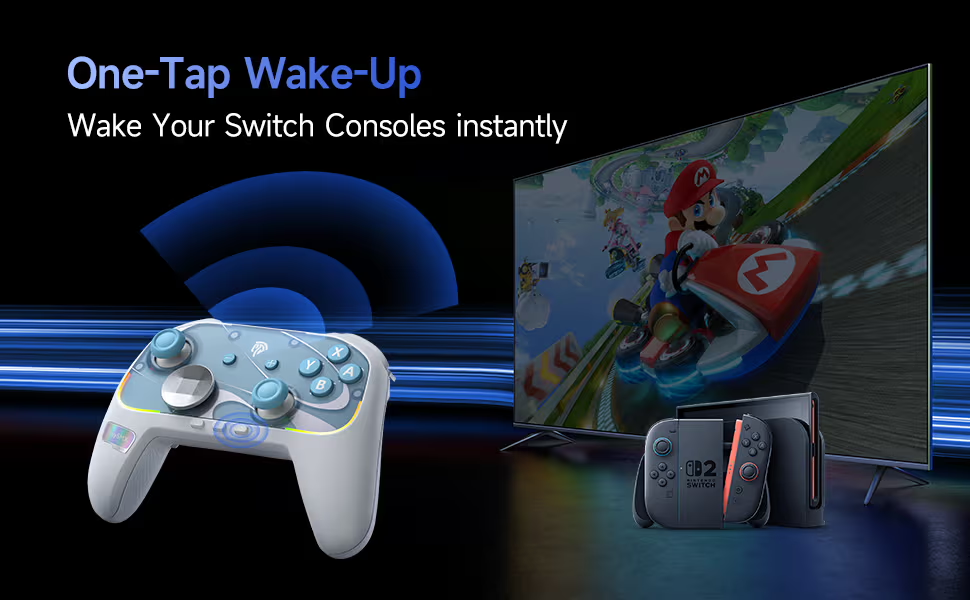
Most importantly, the S10 has been optimized for the Switch, with a lot of the features Nintendo users crave. The S10 comes with advanced motion controls, a built NFC reader for all your amiibos, and a one-tap wake-up feature for the Switch 2. But if you don’t have a Switch, you can enjoy the controller with any of your other devices.

Review

Users will open the box and appreciate how well made and pretty the S10 controller is. It is a little on the lighter side, but it certainly doesn’t feel cheap. I particularly like the textured handles that give the controller its satisfying feel. The additional faceplate and stickers are fun for those who want to customize the controllers, but I am not creative enough to take advantage of this feature. This is a very pretty controller without the need of customization. I love the RGB and how it doesn’t feel intrusive, but it can be shut off if you don’t like it. I think it gives the controller its flare.

Getting past the looks, users will be impressed by the amount of features the controller comes with. The two extra buttons on the bottom of the controller are a very useful and have become a staple in my gaming journey. My favorite feature is the circular D-Pad that made it feel like a smooth joystick. I like that I always have the option to switch to a regular cross D-Pad, but I am finding it hard to. Other than that, the control works well. The haptic controls feel good and add to the immersion, the NFC reader picks up my Amiibos, and sticks feel really good. The controller is responsive out of the box, and it was able to handle all of my gaming needs. Of course I am just a filthy casual, but there is value in it for me regardless.

As great as this controller is, I do have a couple of complaints. One of my complaints is with the sound of the switches. While I didn’t notice any imput lag in either of the connections, the clicking button pressing makes sounds cheap and can get annoying. If you like the ASMR experience that comes with mechanical keyboard switches, there is some value in the S10. I wouldn’t call the sound a deal breaker, but it is something to consider.

My biggest issue with the controller is comfort. Full disclosed, I have a repetitive stress injury that requires certain ergonomics. Controllers, especially cheaply made controllers ruin my hands. While the S10 isn’t the most comfortable or ergonomic controller, I was able to get enough meaningful gaming to keep it in my rotation. The S10 may cause some discomfort, but it is a lot more comfortable than using the joycons.

So what is my final verdict? If you have a switch and need a new controller, the EasySMX S10 is a fantastic option. The gamepad looks great, has a lot of useful features, and is an upgrade from the joycons. You can pick up your S10 gamepad from the official SMX store. Make sure you use my discount code Jose S10 to save a bit of money.

Upgrade Your Keyboard with KiiBoom Strawberry Jello Switches

Kiiboom sent me KiiBoom x Strawberryjam1986 Strawberry Jello Switch Set to review for my blog. While I am very grateful for the opportunity, I won’t let it sway my opinions. This will be my honest review. Make sure you also check out my reviews for the Jade75 and the Phantom81 V3.

Unboxing

Features

The KiiBoom x Strawberryjam1986 Strawberry Jello Switch Set comes with 35 5-pin switches. These are linear switches compatible with MX keycaps. Rated for up to 50,000,000 keystrokes, these switches are built to last. These switches were also built to perform and take on any workload with its ideal actuation and high-accuracy feedback. Most importantly, the housing promises a comfortable typing experience with that satisfying typing ASMR enthusiasts seek.

Sound Test

Review

I used the Strawberry Jello switches to replace the ones that came with one of my budget keyboards. I did not know how budget the keyboard was until I started taking it apart. These switches were a fantastic upgrade, and made an a very usable keyboard into a delight. I first noticed the soft creamy sound that I have come to crave when I am typing. I then noticed how much more comfortable the switches were to use. Each press felt softer and I felt my hard hurt less and less the more I used this keyboard. I did not notice any change in performance. The previous switches did the job, and these handled my workload just as well. The only real difference is that the old switches feel cheap, and I have no intention in putting them back.

If you are looking for a set of switches to either give new life to an old mechanical keyboard or if you’re building a brand new one, these are the KiiBOOM Strawberry Jellos are a great place to start. They are easy to install, they are well crafted, perform well, and they are very cute. If you’re looking to build a cozy setup, you can’t go wrong with KiiBOOM stuff, especially with these switches.

You can pick up your set of 35 KiiBoom x Strawberryjam1986 Strawberry Jello Switches on the official KiiBOOM store for only $19.99.