Tag Archives: gaming accesories

Is the Mechlands M75 the Best Budget Keyboard for Gamers?

Disclaimer

Mechlands sent me the M75 hall effect magnetic gaming keyboard to review for my blog. While I am very grateful for the opportunity, I won’t let it sway my opinions. This will be my honest review.

What’s in the box?

  • Mechlands M75
  • USB-C to USB-A Braided Cable
  • 2 Extra Switches
  • Insert Keycap
  • Plastic Dustcover
  • Key/Switch Puller
  • User Manual

Features

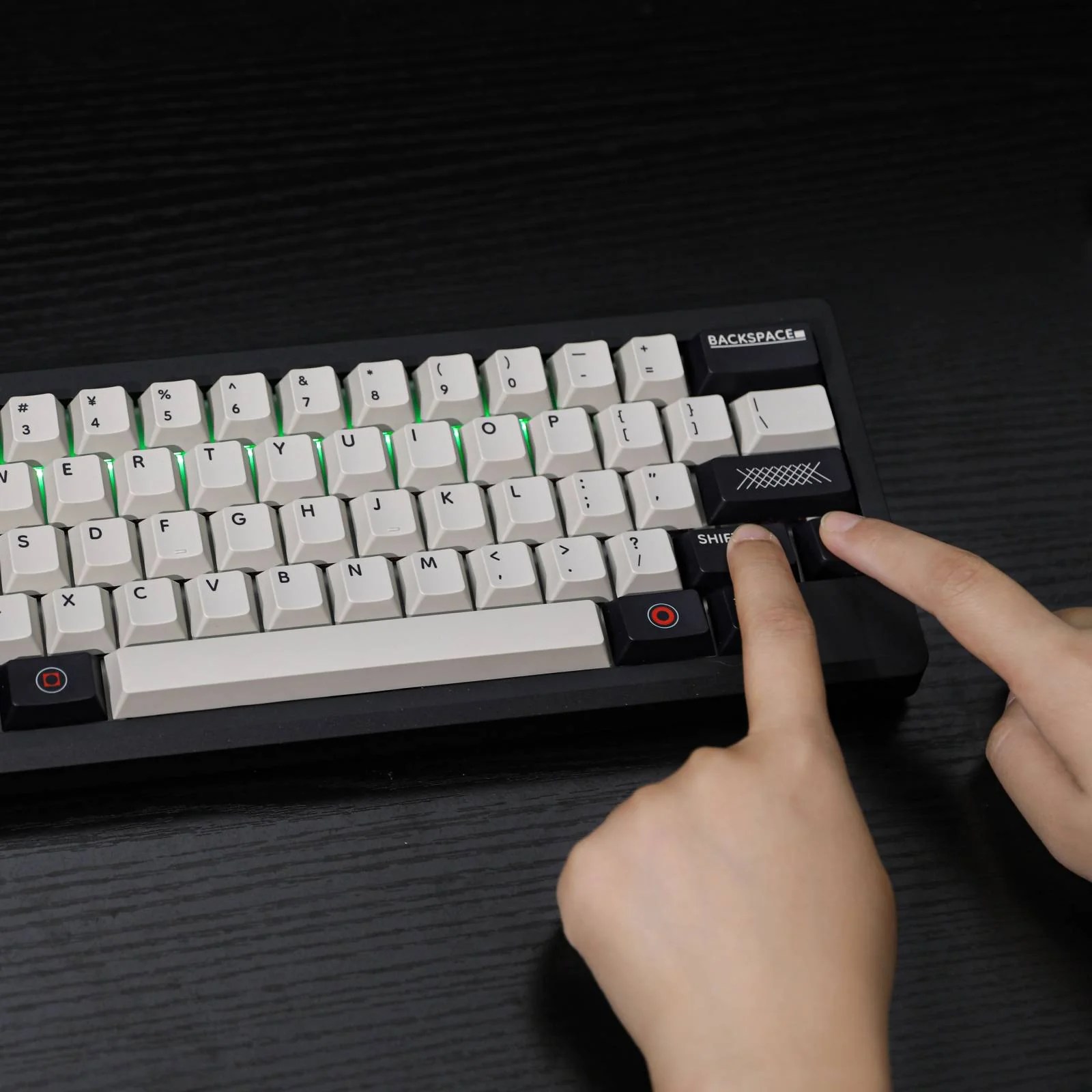
The Mechlands M75 is a 75% hall effect magnetic keyboard designed for the gamer who craves high performing peripherals at affordable prices. This stylish keyboard comes in a green/grey scheme reminiscent of classic xbox. The default typing angle guarantees a comfort for most users, but it is adjustable as needed for added comfort. The M75 features the hall effect magnetic cherry profile switches for a fantastic sound and a great feel. Everything on this keyboard can be swapped easy repair and customization.

This keyboard is more than just a pretty piece of hardware. The M75 is a wired keyboard that boasts only 0.128 latency and 8K polling rate. That means it can keep up with the most competitive level of gameplay when needed. The keyboard also has some added advanced features like programable DKS, MT, TGL, and SOCD (note some FPS ban these features).

Sound Test

Review

The M75 is a fantastic wired keyboard, and a strong contender for a best budget gaming keyboard. The keyboard sports a cool design with a fun color scheme. I like the color scheme, but it isn’t going to be for everyone. The extra wire clutter is also going to be an issue for some folks, but the performance it gets more than makes up for it. It may not match my current aesthetic, but I am very pleased with the performance. The switches have a very soothing sound, and they feel great to the touch. The keyboard layout may not be strictly ergonomic, but I had no issues with hand pain. This is one of the most comfortable keyboards I’ve tried, and I struggle heavily with my repetitive stress injury.

I didn’t notice any latency in gaming. I don’t play at a very competitive level, but it was able to handle all the games I threw at it with no issues. It was very good for Guild Wars 2 PVE content at least. I didn’t mess with any of the the advanced features because I don’t want to risk getting banned, but they are available if that is how you have fun. Overall, I am very happy with the Mechlands M75, and it is definitely going to be my main keyboard for a bit. It is comfortable, cool looking, and it does the job.

If you are looking for your own MechLands M75, pick it up on official MechLands website.

Is the Hack 59 Keyboard Right for You? Key Features Explored

Disclaimer

Epomoker sent me the Hack 59 mechanical keyboard to review for my blog. While I am very grateful for the opportunity, I won’t let it sway my opinions. This will be my honest review. make sure you also check out my other Epomaker reviews to find the perfect keyboard for your setup.

What’s in the Box?

  • Hack 59 Mechanical Keyboard
  • USB-C to USB-A charging cable
  • Key and Switch Puller Tool
  • 2.4 GHz Wireless Dongle
  • User Instructions

Features

The Hack 59 is the mechanical keyboard for the enthusiast who wants to shrink their footprint. This stylish mini-keyboard only has 59 keys with QMK and VIA support so you can make the most of every key. Ramapping is extremely easy, and turns it into a formidable powerhouse. This is a wireless keyboard with bluetooth 5 compatibility with up to 3 different devices, and a wireless 2.4 GHz dongle for those who need it. Its incredible 3000 mAh means less time with wires on your desk for a truelly minimalist experience, but the wired connection is fast and reliable when its needed. All the keys and switches are replaceable, but its unique aesthetic is going to be hard to give up. This is a well machined keyboard with soft RBG lighting that will be a great fit for many setups.

Sound Test

Review

Out of the box, the Hack 59 is an impressive little keyboard with a good amount of potential. I like the aesthetic and unique keys. I also like that it comes with the high quality and care I’ve come to expect from Epomaker. The machining is nice, the design is tight, and printing is clear and visible. I love the included slot for the dongle.

As for its performance, the keyboard is solid with a few modifications. The keyboard does make its noise, but it is a more subtle and soothing clacking. I didn’t notice any latency in any of my games, but the tight design required some getting used to. The battery is solid and I was getting about 10 hours on a single charge, with the the RGB on. It can be switched off for a longer session, but I like epomaker’s RGB lighting.

The biggest issue most people are going to have with this keyboard is with its form factor design. The keyboard has some handy built in shortcuts, and users can easily program more or remap keys through GMK and VIA, but I missed having the arrow keys and control handy. The size was an issue for me because I am too big for the keyboard. I felt like I had to bunch up to use the keyboard which caused some discomfort, and my fat clumsy hands was always pressing the wrong keys. I would erase entire sections of my review with a clumsy mistake, and it made the experience frustrating. This issue is strictly user error and physical limitations, so your millage will vary.

So is the Hack 59 a good keyboard? It depends. If you’re big with wide shoulders and big hands, its not. The size takes away any ergonomic design and it will get uncomfortable. I require special ergonomics for my hands to work, and the size made it hard to use. If you are a size that fits this keyboard, it is a solid device with a bit of tinkering. The only real hurdle I see is knowing if the keyboard is right size, and liking the aesthetic.

If you like the design and don’t mind the 302.7x40x118.5MM dimensions, you can pick up the Hack 59 on the official Epomaker site.

User Guide

Fifine Ampligame D6 Controller Review: A Streamer’s Best Friend

Fifine sent me their Ampligame D6 Stream Controller to review for my blog. While I am very grateful for the opportunity, I won’t let it sway my opinions of the device. This will be my honest review. Make sure you check my other Fifine product reviews like the M9 lavalier mic set or the AM 8 Streaming mic.

What’s in the box?

  • D6 Stream Controller
  • USB-C to USB-C chord with builtin USB-A adapter
  • user manual

Features

The Ampligame D6 stream controller is the ideally sized to take up the perfect amount of desk real estate without losing any function. Its sleek black design and programmable faces make it compatible with most aesthetics. And if it wasn’t obvious the D6 was designed with gamers in mind, the subtle RGB strip that borders the devices comes with a few preprogrammed profiles that can be toggled off at any time.

The D6 intends to improve the user’s workflow without breaking the bank. With its 15 programmable buttons and compatibility with popular content creation tools, the D6 is ready for any type of workload. Each button can be programed with with media controls, macros, and other useful plugins to take a content creation to the next level. Setup is as easy as drag and drop, and there is a plugin store for additional functionality.

Whether it is gaming, editing, or streaming, the Ampligame D6 Streaming Controller promises to do it all brilliantly.

Review

I was very impressed with the controller out of the box. It has a good weight to it and the construction seems solid. It has good quality rubber at the bottom to keep it firm on your desk which is a nice little detail. Turning on the device left me a bit more impressed. Each button has a small screen with good resolution. All of the icons are easy to read and see, and they can be reprogrammed to fit any aesthetic. I also like how the RGB is subtle and doesn’t turn my desk into a rave, and like it even more that I can turn it off when I don’t want it on.

Setting up the streaming deck was easy through the official ap. The ap gives users a decent amount of programmable functions and there is a ap store with free plugins for program specific functions. I didn’t mess with the store too much since the default settings had enough of what I needed.

The buttons were a bit stiff at first, but they do begin to soften after prolonged use. The functions and keys are very responsive, and I like that I can save multiple profiles with multiple pages of shortcuts if I need to switch between different workflows. I do feel like it has helped improve my productivity. It is OBS compatible and it is nice to have access to the functions without having to switch out of the game. I have also started using it for work, using it for shortcuts for programs and macros that I use regularly. My only complaint is that I won’t ever be able to do my work without it.

If you’re looking for an affordable streaming controller with a good amount of utility, the Ampligame D6 gets the job done. You can pick up the Ampligame D6 on Amazon for $78.99 using my affiliate link.

The new COMFO G724X is a Decent Gaming Headset

I was sent the COMFO G724X Gaming Headset to review for my blog. While I am very grateful for the opportunity, I won’t let it sway my opinions. This will be my honest review. Make sure you also check out my review on the Uhuru WM-09 gaming mouse.

What’s in the Box?

  • COMFO G724x
  • USB-A to USB-C charging cable
  • 2.4 G Wireless Dongle
  • Instruction Manual

Features

The Uhuru COMFO G724X Wireless gaming headset might be the budget headset you are looking for. This wireless headset supports and easy to set up a 5.3 Bluetooth connection, but it also has a responsive 2.4 G wireless receiver for those who need it. With a boasted 32-hour battery life, this headset is virtually wireless. This means you won’t have to pause your game in the middle of your raid to look for a charging cable. Running out of battery is not even an issue because the headset works just as well through a wired connection.

Function aside, the COMFO G724X comes in a sleek ergonomic design that doesn’t lean too heavily onto the gaming aesthetic. Its detachable mic makes it ideal for travel, and its soft padding makes for comfortable gaming sessions. Best of all, there is a bit of RGB for a little extra flair. The headset comes in white or black, so users can pick something that matches their aesthetic.

Sound Test

https://churapereviews.com/wp-content/uploads/2024/11/comfog724x.mp3

Review

The COMFO G724X does feel a bit cheap, but adequate for its price point. The headset can withstand a bit of flex, but it feels like it can snap easily if taken too far. The included buttons feel stiff, but they are responsive. The microphone is flexible and in an ideal position. Getting past the cheap plastic feel, the construction looks solid.

It has a nice subtle design, and both color schemes look good. I think the different colored curled wire connecting the two earpieces is a nice touch. I also like how the RGB is an accent rather than a rave on my head. The RGB can be easily turned off, but leaving it on never became an issue.

The headset is comfortable, especially for long gaming hours. The soft cushion means it loses a bit of soundproofing and there is some bleed, but it’s not a huge issue. I like that my ears didn’t get too hot after long sessions.

I do have mixed feelings about the performance. The headset did give me about 32 hours of gaming on a single charge, but the sound leaves a bit to be desired. Without using any third-party devices, the sound quality feels a little flat. I am not expecting high fidelity at this price point, but I have heard better. The sound issue could be personal since I enjoy a lot of bass, but it is worth mentioning that the G724X doesn’t have enough.

The microphone is fine. I wouldn’t use it for anything professional like podcasting, but it is a decent enough mic for everyday gaming. I had no issues communicating with people online. I think the sound is a little muggy, but it does have decent enough sound cancellation.

If you’re looking for a decent budget headset, the COMFO G7234X will get the job done. You aren’t getting the deepest sound stage or crispest recording, but you’re getting a long-lasting wireless headset that will get you through your next raid. At this price point, you can definitely do worse.

The EasySMX X15: The Prettiest Budget Controller on the Market

I was sent a free EasySMX X15 controller to review for my blog. While I am very grateful for the opportunity, I won’t let it sway my opinions. This will be my honest review.

Whats in the box?

The controller comes with:

  • 1 USB-C to USB-A braided charging cable
  • 1 2.4G Wireless dongle
  • 1 instructions manel

Features

The X15 is a stylish budget controller for the gamer who wants to upgrade their aesthetic but doesn’t want to go broke. Its beautiful RGB accents help it stand out against other controllers in the market, but they can also be toggled off for those who prefer a more subtle aesthetic. The controller comes in Mecha (black) or StarfieldI chose the Starfield version because I preferred the design, but it was not an easy choice.

The X15 supports wired, wireless, and Bluetooth connections, boasting up to 20 hours of gaming on a single charge. That said, the included braided cable is long enough to keep you gaming while charging your controller.

Most impotanlty, the EasySMX X15 features:

  • Hall effect joy stick to eliminate the risk of stick drift
  • Hall Triggers for smother inputs
  • Tactile face buttons
  • 2 additional programmable triggers on the bottom
  • Textured grip

For only $39.99, the x15 is sounding like a very good deal.

Review

The EasySMX X15 is a beautiful controller, but one that will initially feel cheap. I was not a fan of how light this controller is compared to what I am used to. The face buttons also make a cheap plastic click when pressed which made me uneasy about the build quality. The more I used the controller, the less these issues became a problem.

The controller feels wonderful in my hands. The textured face buttons give the controller a hint of elegance, but it makes the buttons feel good to press. The controller is textured exactly where it needs to be, and the design fits comfortably in my hands. Most controllers, especially budget ones, tend to destroy my hands and leave me unable to play after only a few minutes. While the controller is not explicitly ergonomic, it is ergonomic enough to allow me to enjoy gaming with a controller.

As far as function, it works better than most budget controllers in its price range. The Hall effect triggers and joysticks don’t feel any better than a 1st party Xbox controller, but it feels a lot better than a cheap controller. Inputs seemed fine for the most part, but I did notice some games needed additional remapping. The additional triggers are easy to program and fantastic. They are in a good spot, easy to press, and responsive enough to make an impact. I can’t speak on how good the controller is for competitive play, but it was good enough for my Destiny 2 grind on PC, and some casual Genshin Impact on my iPad. Switching between devices is a pain, so you will probably want to keep this tied to one device.

I was pleasantly surprised by the controller’s battery life. I got pretty close to the boasted 20 hours of gaming with the RGB on. I didn’t test the life without the RGB because it looks so pretty, but I can only assume you get more.  

As far as budget controllers go, the EasySMX X15 should be at the top of the list. Even with its flaws, you aren’t getting anything better at this price range.

You can pick up the EasySMX X15 for only $39.99 on the official website, or Amazon through my affiliate links.

The Uhuru WM-09 is the Perfect Budget Gaming Mouse

I was sent the Uhuru WM-09 gaming mouse for free to review for my blog. While I am very grateful for the opportunity, I won’t let it sway my opinions. This will be my honest review.

What’s in the box?

Inside you get:

  • The Uhuru WM-09 Gaming Mouse
  • Instruction Booklet
  • Grip tape for sides and button
  • USB-C to USB-A Charging Cable
  • USB-C Wireless Dongle

Features

The Uhuru WM-09 is a lightweight mouse that supports up to 70 hours of wireless gaming, but a wired connection won’t slow you down. With 26000 DPI, a 2.4G wireless connection, and a 100-500 hz scroll, the WM-09 is ready to take you on your most epic of quests. Its sleek and simple design is for gamers who prefer a cleaner aesthetic, but 11 preprogrammed RGB modes make it ready for any mood. I particularly like that the RGB and logo are simple, clean, and unimposing. Plus you can toggle off the RGB with a switch is a major plus. Best of all, the buttons are programable with third-party software so you can always have a loadout that works best for your playstyle.

Review

At first, the Uhuru WM-09 is going to feel and sound like a cheap plastic mouse, but that feeling will go away after some use. I was instantly blown away by how reactive this mouse is without any tinkering. The weight and DPI make reflexive games feel better. It took some getting used to because I preferred a heavier mouse before the WM-09, but my aim felt like it got better once I did.

The WM-09 has a beautiful glide that works on any surface. I still recommend using a mouse pad, especially in the dark, but you don’t really need one. The mouse felt just as responsive on my desk as it did on a mousepad.

My favorite feature has to be the included grip tape. I have excessively sweaty hands, especially during intense gaming sessions, but the grip tape made it feel less gross and I was able to maintain my traction.

This wouldn’t be a gaming mouse without RGB, and the preset profiles are just beautiful. The mouse gives off enough light to look good on the desk without turning the room into a rave. I like that it acts as a subtle accent, but I also like that I can turn it off when I don’t need it.

The most impressive feature has to be the mouse’s battery life. I’ve had the mouse for a couple of weeks now and have only needed to charge it twice after regular heavy use with the RGB turned on. Uhuru boasts a 70-hour battery life, and I am inclined to believe it.

The only complaint I have with the mouse is with the ergonomics. If you’re looking for a budget mouse that will save your hands from pain, this isn’t in. While my RSD doesn’t flair up as quickly or as badly as with other cheap mice, it does flair up after an hour or so of use. If you don’t spend the unnatural amount of hours in front of a computer that I do, this isn’t going to be a problem. This will vary between users.

If you’re looking for a solid budget gaming mouse that will take your gaming to the next level, try the Uhuru WM-09. It is a lightweight responsive mouse with a sleek design and amazing battery life.

You can pick up the Uhuru WM-09 Gaming Mouse on Amazon for $27.99 (Currently on sale for $19.59) using my affiliate link.

The Epomaker P75 is a Fantastic Mechanical Keyboard!

Epomaker sent me their most popular keyboard, the P75 with the Wisteria Linear switches, for free to review for my blog. While I am very grateful for the opportunity, I won’t let it sway my opinions. This will be my honest review. You can find the P75 and Epomaker’s other stylish keyboards on their official website.

What’s in the Box?

The P75 comes beautifully packed. Inside you’ll find:

  • The Epomaker P75 Keyboard
  • Braided USB-A to USB-C chord
  • The space bar, arrow keys, and escape button in white (for those who want that all-white aesthetic
  • Wireless dongle
  • 3 replacement switches
  • Key puller tool
  • Allen wrench

Features

The P75 is a 75% keyboard with wired, wireless, and Bluetooth support. It allows connectivity to several devices from laptops, phones, and even popular gaming consoles. Its south-facing 8-color RGB makes it easy to see the 16 preprogrammed profiles. Coupled with the easily swappable keys and keycaps, the P75 is a perfect fit for any setup. The P75’s 4000mAh gives users a solid wireless session, and the volume dial is a nice touch.

Most importantly, the keyboard comes in three switches for a completely customizable experience. The available switches:

  • Zebra Switch: Linear, 5-pin, Travel: 1.8/3.8mm, Force: 40/45gf   
  • Wisteria Linear Switch: Linear, 5-pin, Travel: 2.0/3.6mm, Force: 45/62gf    
  • Wisteria Tactile Switch: Tactile, 5-pin, Travel: 2.0/3.1mm, Force: 46/62gf

Sound Test

https://churapereviews.com/wp-content/uploads/2024/09/epomakersoundcheck.mp3

Review

The Epomaker P75 is a fantastic mechanical keyboard. I love the sleek design of its aluminum finish and the simple yet beautiful color scheme. The Wisteria Tactile Switches emit a beautiful creamy click that I find incredibly satisfying. Be mindful. It is a little loud, and the sound might annoy the people around you.

While the keyboard is easy to setup, I recommend keeping the manual. The keyboard comes preprogrammed with various useful commands for controlling RBG, media, check the battery, and open certain programs. The commands are easy to memorize, especially if you only care about the ones you use most often.

I used to only ever use wired connections, but I am converted. I like the lack of clutter and how easy it is to switch between devices. I have the devices connected to my gaming pc and work laptop, and switching between them is as easy as flipping the switch. The switch is easy to reach and responsive without it being too easily flipped.

I used the keyboard for both work and gaming and was impressed by the battery life. With the RGB turned up, I get a solid eight hours of steady heavy use. I can get a longer session with the RGB turned off, but it looks so pretty that, I didn’t want to test it.

The keys feel very good to the touch, and make typing a delight. Gaming with the P75 is a solid experience. The keys are responsive enough for any style of gaming, and they are soft enough that they don’t require hard presses. I am glad this keyboard doesn’t destroy my hands after an intense gaming session.

I get pretty bad repetitive stress disorder, and the wrong keyboard destroys my hands. I typically use a special keyboard to avoid a painful flair-up, so there was some anxiety when I switched to the P75. While it is by no means a true replacement for my original ergonomic setup, I am having trouble finding a reason to switch back. There is still some faint pain that comes after prolonged use, but it isn’t anything unbearable. I’ve had keyboards that leave my hands useless, but P75 is comfortable. That doesn’t mean I won’t try to get one of their split options for comparison, but I think this will remain my daily driver until my hands say otherwise.

The Epomaker P75 is a fantastic mechanical keyboard for anyone looking. Its size, color scheme, and wireless capabilities make it the perfect candidate for any minimalistic setup. If you’re looking for a quality yet budget mechanical keyboard, I can’t recommend this enough.

You can pick up your Epomaker P75 for $99.99 on the official website.

The Best Budget Headset: Fifine H9 Gaming Headset

I was sent a free pair of Fifine’s H9 Gaming Headset to review for my blog. While I am very grateful for the opportunity, I won’t let it sway my opinions. This will be my honest review. If you enjoy my reviews, please leave a like, comment, and share this with your friends. Don’t forget to follow the socials!

Unboxing

What’s in the Box?

I was a little disappointed that the headset didn’t come with packaging to keep it from moving, but these sturdy durable things don’t really need it. The H9’s are 3.5 mm, but it comes with an audio box that converts it to USB. I used it as a USB headset and I appreciate the extra long chord and clip. The Mic is detachable which means it travels great.

Build Quality

I was disappointed when I first opened the box because the headset looked cheap. It doesn’t help that the box had no protective packaging to keep it in place. I wasn’t expecting a high-end titanium headset, but the H9s look like a kid’s toy. 

My opinion changed when I picked up the headset. The headset is surprisingly durable. It isn’t a buy-it-for-life type deal, but they are going to last you longer than other headsets at a similar price point. They won’t survive a pitch to the wall after an intense rage quit, but I’ve already dropped them enough times to be confident in my statement. 

The included USB audio box feels cheap. The audio box controls audio and mic volume, mutes/unmutes the mic, and has a handy clip. The volume buttons sink into the device when pressed and feel flimsy. The mic mute switch feels stiff. I found it more convenient to use my keyboard audio controls so it’s not a huge deal, but the mute switch is a fantastic feature. The clip is easily the audio box’s sturdiest part and a good way to tame the excess wire slack. The H9 Gaming Headset truly is a solid headset for the price point. 

Mic Quality

The mic is removable, which is nice for travel or when you don’t need it. I was very happy with the length, and its flexibility means it always be at the ideal position. The sound quality of this mic out of the box is phenomenal. I was amazed by how good I sounded without the need for any processing. I’ve used cheap headphones that made me sound distant or garbled, but that isn’t an issue with the H9s. Processing the sound through OBS or a third-party app like Voice Meeter will make these sounds even better. 

You aren’t getting a professional-sounding mic, but you are getting a very clear and intelligible sound which is all you really need when it comes to headsets. 

Mic Sound Check Out of the Box

https://churapereviews.com/wp-content/uploads/2024/05/fifineh9gamingheadset.mp3

Mic Sound Check With Processing

https://churapereviews.com/wp-content/uploads/2024/05/h9gamingheadsetfixed.mp3

Sound Quality

I am not an audiophile, and can’t tell you how these compare to a top-of-the-line experience. I honestly couldn’t even tell you the difference. For every day, daily beaters, you can’t get a better sound stage. Everything sounds crisp, clear, and fine. Some cheap gaming headsets overcompensate with bass and you get a strange mechanical sound, but the H9’s sound warm with a solid range. I do wish there was a bit more bass, but I’ll live. 

The H9 Gaming Headset has some solid noise cancellation, even at low volumes. They aren’t perfect. You’ll hear some of the louder noises poke through, but the amount of soundproofing you get is impressive. There is some noise bleed, but I wouldn’t say it is distracting. 

The headset has a 7.1 mode that you can toggle from the USB audio box, but I felt like it was more marketing than functional. It doesn’t sound bad, especially compared to some other devices I’ve tried, but you aren’t getting true 7.1. It sounded artificial, and while it wasn’t bad, I preferred using the normal mode. I can see it being helpful in an FPS, but I don’t think it’s good enough to give you any type of competitive edge. It’s a nice feature, but not the reason to pick up this headset.

Impressions

I’ve only been using the H9 Gaming Headset for two weeks now, but they’ve become my daily drivers. I have a nice pair of open-back headphones and a decent desk mic, but I am not ready to go back. I love the convenience the headset provides, and it is good enough for what I need. 

The sound does feel a little flat for my taste, but otherwise, it is great for the price point. What I love most is how good the mic sounds. It’s not professional, but people on the other end can understand me.

If you’re looking for a budget headset that is decent quality, pick up a pair of the Fifine H9 Gaming Headset is a fantastic option. This is a very comfy headset that does its job, doesn’t break the bank, and should last you long enough to be worth the money. 

The Fifine H9 Gaming Headset is available in Black, Pink, and White for $39.99 on Amazon through my affiliate link. 

GLYDR, a Unique Gaming Accesory you control with your Feet!

The GLYDR Kickstarter just launched, and it was fully funded in only 40 minutes. GLYDR is the gaming accessory that aims to revolutionize the way we play games, and promises to save some hands in the process. It is not attempting to replace the traditional controller, but rather supplement the existing ecosystem in the hopes of creating a more ergonomic solution to gaming. As someone who struggles with chronic hand pain, I welcome anything that allows me to enjoy longer gaming sessions. 

What is GLYDR

GLYDR is a programable gaming foot pad with 16 programable actions. This allows gamers to offload some of the more extraneous commands to a part of the body that frankly, could use the exercise. GLYDR grants players access to a library of profiles to choose from, and the ability to create their own ensuring you always have a setup that works best for you. As someone who constantly jumps between genres, I need something that I can easily reprogram and adapt. This seems like a solid solution. 

Go Back Now

Early backers can get them as cheap as $189. Act quick! As of writing this, there are $50 units left at this price, then it jumps to $249. Shipping and taxes apply when the item is ready to ship. I don’t have the money to buy one of these right now, but I thought it was at least worth the gander. Go back the Kickstarter today!

If you enjoy these updates, please leave a like, comment, follow, and share this with your friends!

Nacon just released a couple of controllers you’re going to want to add to your holiday list

NACON just released two limited edition controllers for the Xbox: The Revolution X Field Camo Controller and the Colorlight Wired Gamepad. These unique and exclusive controllers will make the perfect gift for the gamer in your life. If you enjoy these updates, make sure you like, comment, subscribe, and share this with your friends!


REVOLUTION X FIELD CAMO CONTROLLER $74

The Revolution X is the release I am most excited about. While I am not too crazy about the camo, the features more than make up for it. The Revolution X promises to be a competition-grade accessory with limitless customizable options in both inputs and accessibility. Use the app to remap inputs and adjust trigger dead zones, thumbstick sensitivity, and anything that will give you a competitive edge. Best of all, you can save up to four profiles so you can always have the right settings ready to go! The interchangeable weight and thumb stick system, and its heavy-duty design make this the perfect controller for most gamers.

The Revolution also comes with a high-quality braided cable for low latency inputs and four programable triggers on the underside to give gamers a real competitive advantage. I have a few games that would make great use of those triggers.

The controller is $74, which is a pretty solid price point for the amount of features you get. If you don’t want to spend the premium for the Xbox Pro controller, the officially licensed Revolution X by NACON seems like a solid option. Get yours now, exclusively at Walmart.


COLORLIGHT WIRED GAMEPAD ($39.99)

The Colorlight Wired Gamepad is designed for the gamer who needs more RGB in their life. It features 6 LED’s with 25 color variations, 4 lighting effects, and 3 scrolling speeds for an endless amount of combinations. While it may not have as many features as the Revolution X, you are still getting a durable 3m braided cable for low latency, customizable thumbstick sensitivity, and adjustable trigger dead zones. I doubt these settings will be as robust as the Revolution X’s, but they are neat features to have on a fun controller. The Colorlight Wired Gamepad is a GameStop exclusive, and you can pick yours up for $39.99.